A dealer returns 40 cartons. Another customer gets a 2% turnover discount at quarter end. A third was billed at the wrong rate.
All three need a credit note. Get one detail wrong and you keep paying GST you no longer owe, or your buyer keeps input tax credit the law says they must give back.
This page gives you a free credit note format with 8 GST templates, an Excel method that works out your 30 November deadline and the right GSTR-1 table, and the 3-Gate Credit Note Test for deciding between a GST credit note and a financial one. It also covers what changed on 1 November 2026, which most templates online still miss. Marathi and Hindi versions are included.
Quick answer
A credit note format is a standard layout for the document a GST-registered supplier issues to reduce the value or tax of an earlier invoice, for example after a sales return, a post-sale discount or excess billing. Under Rule 53(1A) of the CGST Rules it must show the supplier and recipient details, a serial number, the original invoice reference, taxable value, tax and a signature.
- GST law prescribes no fixed credit note layout, but Rule 53(1A) of the CGST Rules lists 9 particulars every credit note must carry, including the original invoice number and the tax credited.
- Section 34(1) of the CGST Act allows a credit note when the invoice value or tax was too high, goods are returned, supplies are deficient, and, from 1 November 2026, for post-sale discounts.
- From 1 November 2026, post-sale discounts no longer need a prior agreement linked to invoices. The supplier issues a credit note and the buyer reverses the matching input tax credit.
- Since 1 October 2025, the supplier cannot reduce output tax on a credit note if a registered buyer has not reversed the input tax credit.
- A credit note for FY 2025-26 supplies must be declared by 30 November 2026, or by the annual return date if that is earlier.
Contents
- Free credit note format: the 8 templates
- What is a credit note under GST?
- What changed in 2025 and 2026
- What to include in a credit note format
- GST credit note or financial credit note?
- Credit note decision table: 12 scenarios
- Time limit: the 30 November deadline
- Reporting in GSTR-1, IMS and GSTR-3B
- Credit notes and e-invoicing
- How to make a credit note format in Excel
- 8 credit note format samples
- Common mistakes
- FAQ
Free Credit Note Format: The 8 Templates
Pick the template that matches why you are reducing the invoice, add your letterhead and issue it against the original invoice number. The copy-ready samples are in the eighth section of this page.
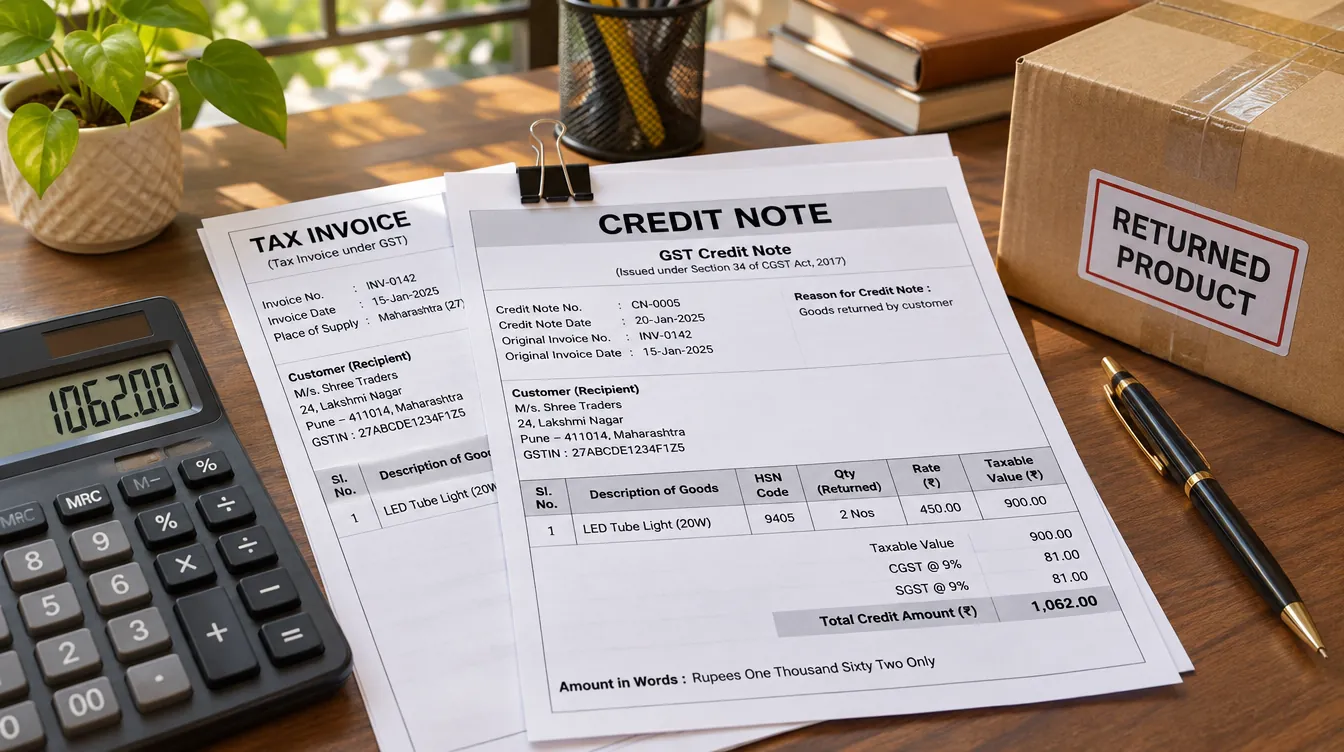
| # | Template | Best for |
|---|---|---|
| 1 | Standard GST credit note (sales return) | Goods returned by a registered buyer |
| 2 | Simple credit note format | Small businesses that need a clean, basic layout |
| 3 | Post-sale discount credit note | Turnover discounts, rebates and schemes given after billing |
| 4 | Rate difference or excess billing credit note | Wrong price, wrong quantity or wrong tax rate on the invoice |
| 5 | Credit note for an unregistered customer | Returns from retail customers and walk-in buyers |
| 6 | Financial (commercial) credit note, no GST | Discounts where the buyer will not reverse input tax credit, or after the deadline |
| 7 | Credit note format in Marathi (क्रेडिट नोट) | Dealers and distributors in Maharashtra |
| 8 | Credit note format in Hindi (क्रेडिट नोट) | Hindi-speaking parties across India |
What Is a Credit Note Under GST?
A credit note under GST is a document a registered supplier issues to the buyer to reduce the taxable value or tax charged on an earlier tax invoice. It lowers the buyer's payable amount and, when it meets the conditions in Section 34, lowers the supplier's output tax as well.
Section 34(1) of the CGST Act allows one or more credit notes for the supplies of a financial year when the invoice shows a taxable value or tax higher than what is payable, when goods are returned, or when goods or services turn out deficient, according to the text on the CBIC tax information portal. From 1 November 2026, post-sale discounts under Section 15(3)(b) are an express ground too (GSTDost).
There is no official template. The CBIC credit note flier states there is no prescribed format, only prescribed particulars. That is why one business can use Excel, another Word and a third its billing software, and all three are valid.
Credit note vs debit note
A credit note reduces an earlier invoice, while a debit note increases it. Under GST both are issued by the supplier, which is why a debit note and credit note format look almost identical. Many buyers also send a "debit note" to request a return or price cut, but that is a purchase-side document, not the Section 34 debit note.
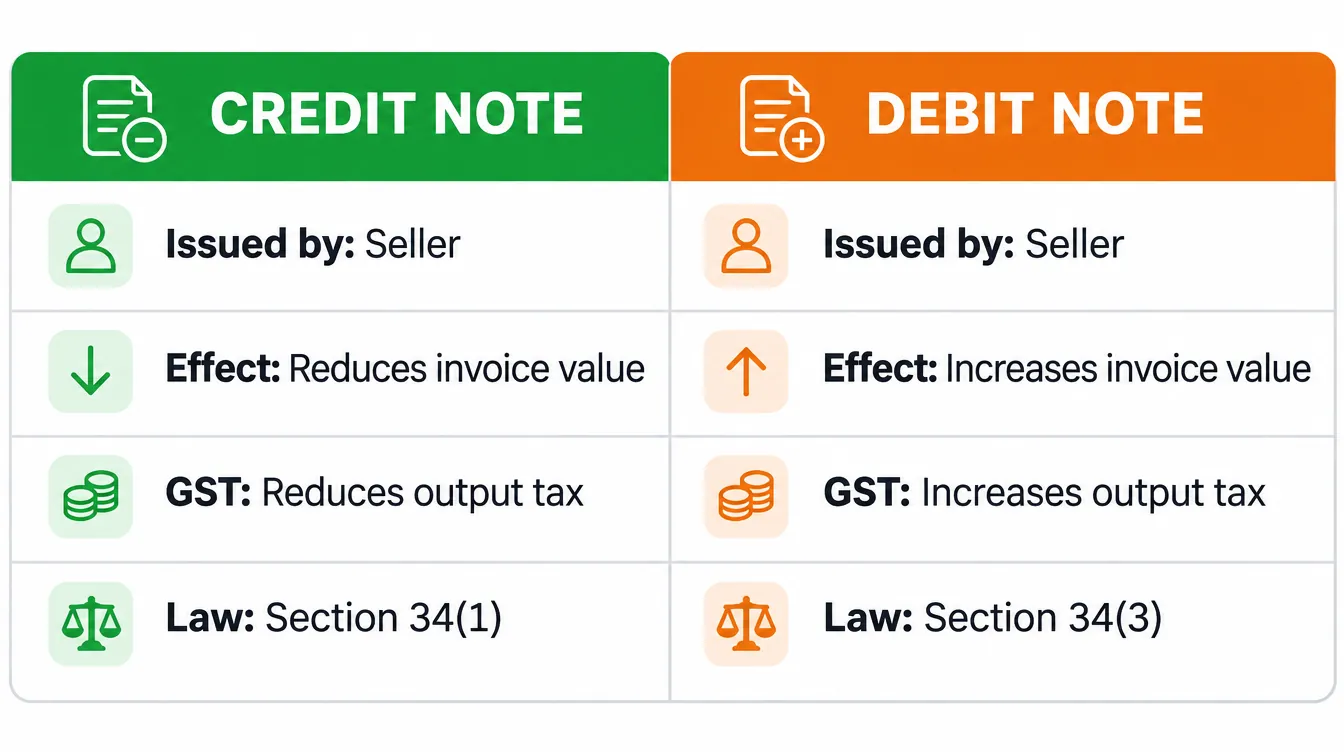
| Point | Credit note | Debit note |
|---|---|---|
| Issued by (under GST) | Supplier | Supplier |
| Effect on invoice | Reduces value or tax | Increases value or tax |
| Effect on supplier's GST | Reduces output tax, subject to conditions | Increases output tax |
| Law | Section 34(1), CGST Act | Section 34(3), CGST Act |
| Time limit | 30 November after FY end or annual return, if earlier | No such limit for declaring |
| Particulars | Rule 53(1A) | Rule 53(1A) |
If you are setting up the full document set, see our purchase order format and delivery challan format.
What Changed for Credit Notes in 2025 and 2026
Three changes now shape every GST credit note: a registered buyer must reverse input tax credit before the supplier's tax comes down (from 1 October 2025), the CA certificate procedure was withdrawn (1 October 2025), and post-sale discounts no longer need a prior agreement (from 1 November 2026). Most free templates online were written before any of this.
1. Buyer's ITC reversal is a condition (1 October 2025). Section 126 of the Finance Act 2025 substituted the proviso to Section 34(2) (Income Tax Department).
The supplier gets no reduction in output tax if the input tax credit linked to the credit note has not been reversed by a registered recipient, or, in other cases, if the tax has been passed on to someone else (TaxGuru). Practitioners date this from 1 October 2025 (TaxTMI).
2. No more CA certificates (1 October 2025). Circular No. 253/10/2025-GST withdrew Circular 212/6/2024-GST, so suppliers no longer need an undertaking or a CA/CMA certificate to prove the buyer reversed ITC on a discount.
Keep your own evidence anyway; the obligation to reverse did not go away.
3. Post-sale discounts simplified (1 November 2026). Section 153 of the Finance Act 2026 substitutes Section 15(3)(b), and Section 154 amends Section 34(1). Notification No. 03/2026-Central Tax, dated 26 October 2026, brings both into force from 1 November 2026, and they are not retrospective (GSTDost, Taxscan).
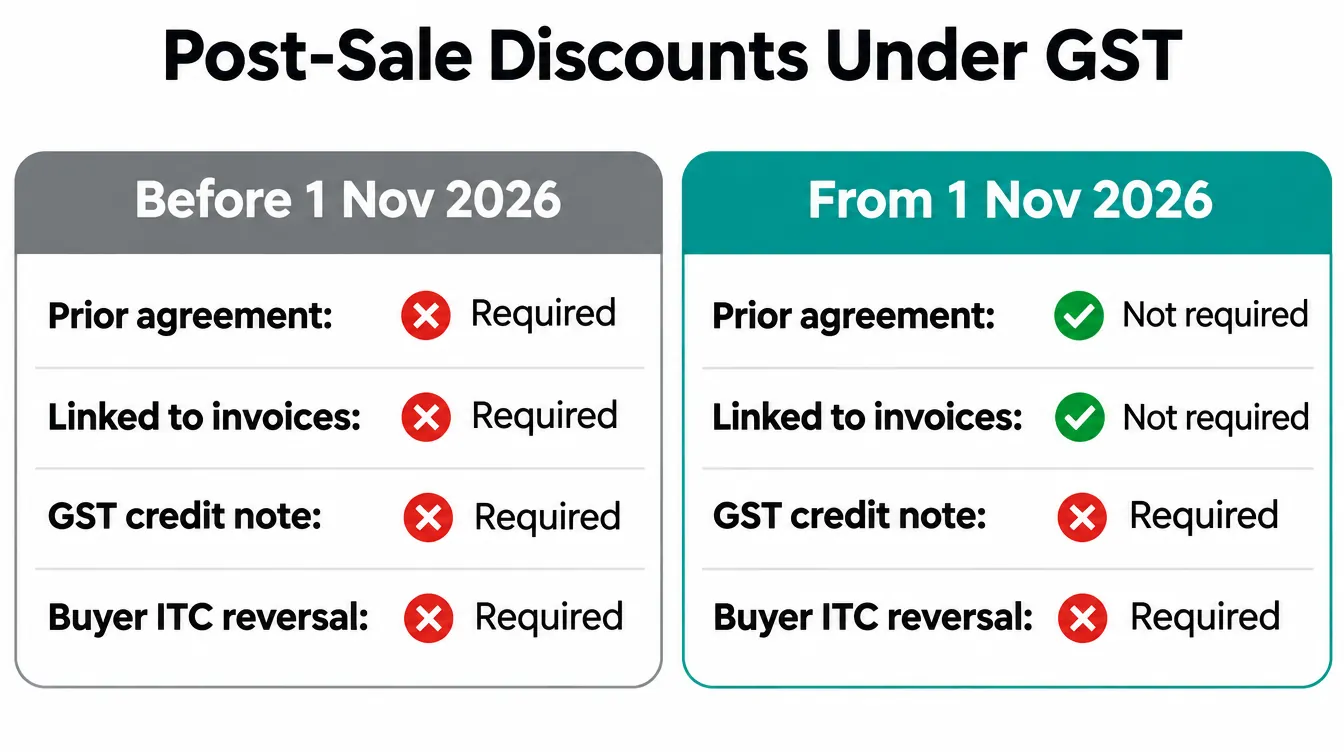
| Post-sale discount | Before 1 November 2026 | From 1 November 2026 |
|---|---|---|
| Agreement before the supply | Required | Not required |
| Discount linked to specific invoices | Required | Not required |
| GST credit note by supplier | Required | Required |
| ITC reversal by buyer | Required | Required |
| Proof to tax officer | CA certificate until 30 Sep 2025, then own records | Own records |
For a distributor that announces a scheme mid-quarter, this is the big one. A discount decided after billing can now reduce GST, as long as the credit note is issued and the dealer reverses the credit.
What to Include in a Credit Note Format
A GST credit note format must carry the 9 particulars in Rule 53(1A) of the CGST Rules, and a practical one adds 6 more fields that make it easy to approve, match and report. Here is the legal minimum, as reproduced by the CBIC rules portal and Indian Kanoon.
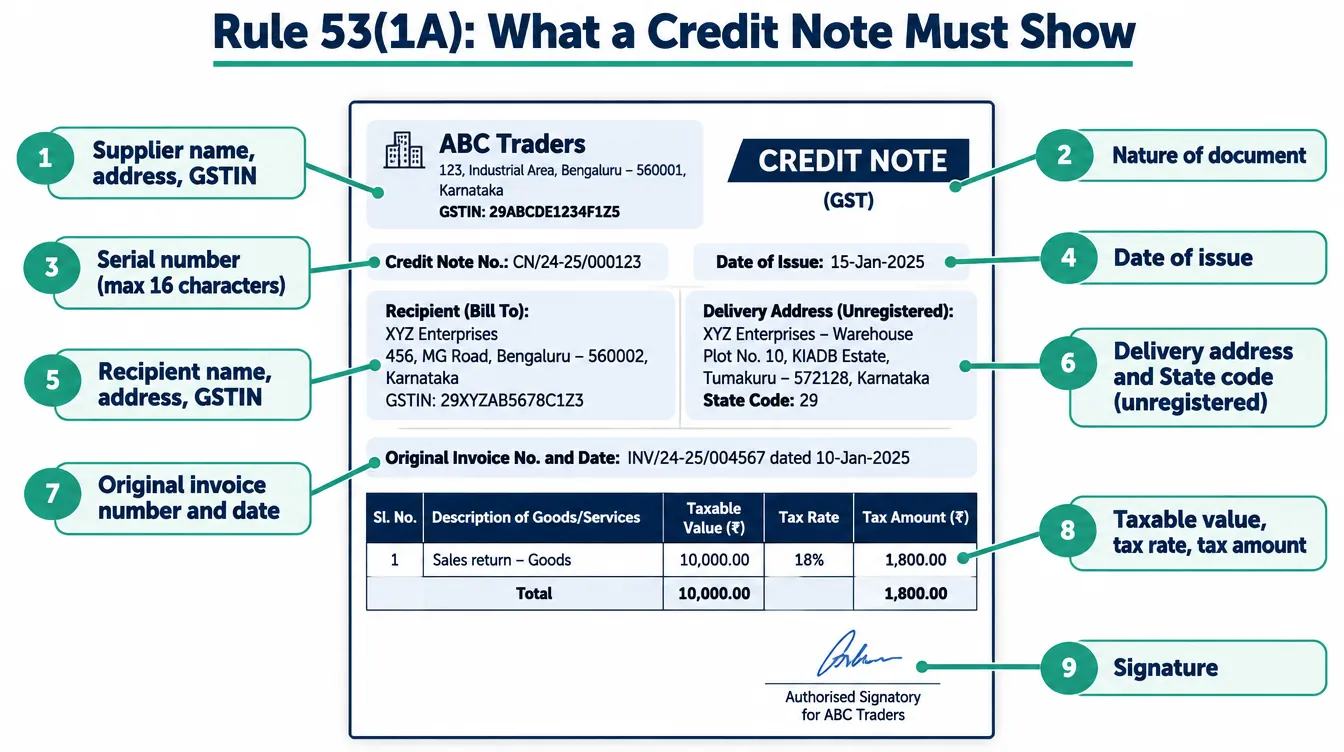
| # | Field (Rule 53(1A)) | What to write |
|---|---|---|
| 1 | Supplier name, address, GSTIN | Your legal name and the GSTIN that issued the invoice |
| 2 | Nature of document | "Credit Note" in the heading |
| 3 | Serial number | Consecutive, up to 16 characters, unique for the financial year, e.g. CN/26-27/0018 |
| 4 | Date of issue | Date you issue the credit note |
| 5 | Recipient name, address, GSTIN or UIN | If the buyer is registered |
| 6 | Recipient name, delivery address, State name and code | If the buyer is unregistered |
| 7 | Original invoice number(s) and date(s) | One or more tax invoices or bills of supply |
| 8 | Taxable value, tax rate, tax amount credited | CGST + SGST or IGST, line by line, with the same HSN code as the invoice |
| 9 | Signature | Of the supplier or authorised person, physical or digital |
Do not skip the tax columns on a GST credit note. Tax expert TNC Rajagopalan told Business Standard that the rate and amount of tax must be shown, even for an agreed B2B discount.
Six fields we add to every template in the pack:
| # | Extra field | Why it helps |
|---|---|---|
| 10 | Reason for credit note | Sales return, discount, rate difference, deficiency; your auditor will ask |
| 11 | Type: GST or financial | Stops a commercial discount from being reported as a tax credit note |
| 12 | Goods return reference | Inward challan or GRN number for returned stock |
| 13 | Place of supply | Needed to report the note with the right tax type |
| 14 | ITC reversal confirmation | Buyer's acknowledgement, your evidence after Circular 253/10/2025 |
| 15 | Last date to declare | 30 November of the next financial year, so nobody misses it |
GST Credit Note or Financial Credit Note? The 3-Gate Test
Issue a GST credit note only when the reduction has a Section 34 ground, the buyer will reverse the matching input tax credit, and you are still within the 30 November deadline. If any gate fails, issue a financial credit note without GST. We call this the 3-Gate Credit Note Test: Ground, Reversal, Clock.
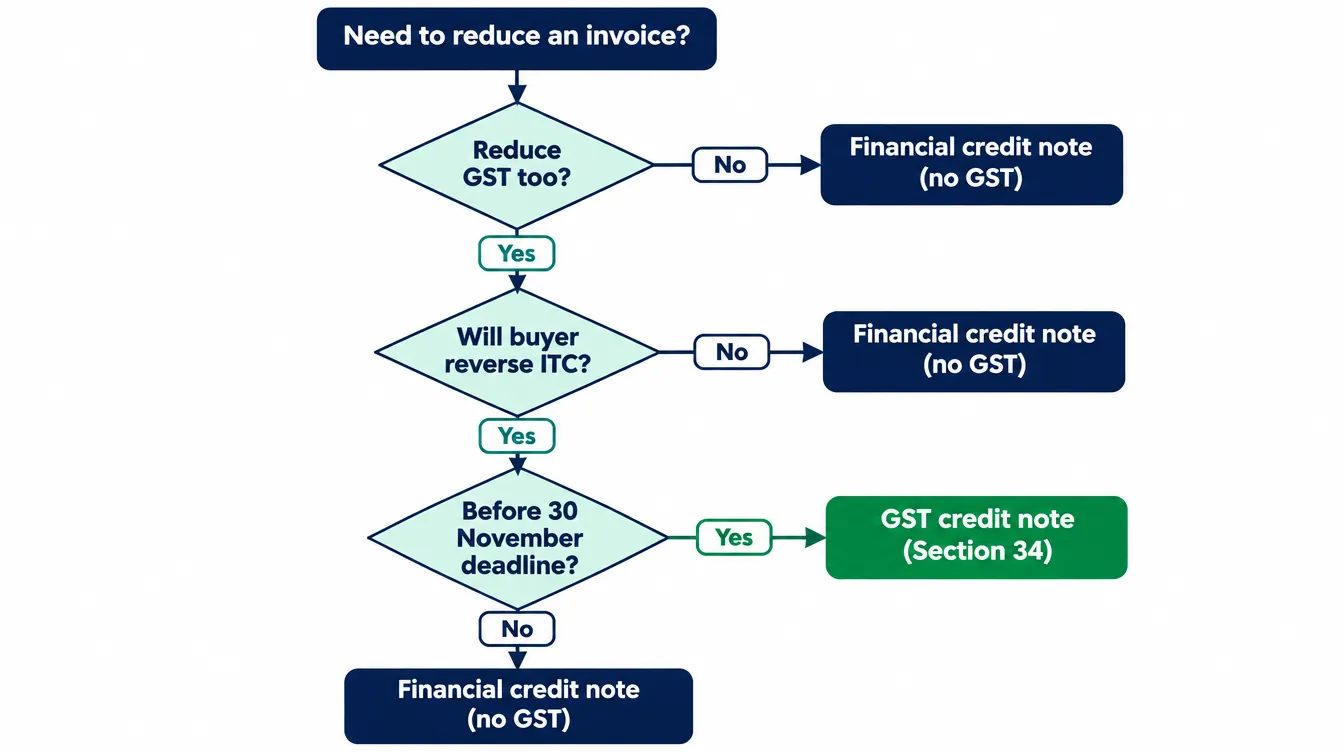
| Gate | Question | Law | If "no" |
|---|---|---|---|
| 1. Ground | Is it a return, excess value or tax, deficiency, or post-sale discount? | Section 34(1), Section 15(3)(b) | No GST credit note; correct with the right document |
| 2. Reversal | Will a registered buyer reverse the ITC linked to it? | Section 34(2) proviso | Financial credit note, no GST change |
| 3. Clock | Is it before 30 November after the FY end (or the annual return date)? | Section 34(2) | Financial credit note only |
A financial (commercial) credit note reduces what the buyer owes you in your books, but leaves the GST on the original invoice untouched. GSTDost recommends using one when the recipient will not reverse ITC, and keeping GST and commercial credit notes in separate series (GSTDost). Busy's July 2026 guide makes the same split: a tax credit note reduces GST and goes in returns, a financial one does not (Busy).

Worked example. A Pune manufacturer invoices a Nashik dealer ₹5,00,000 plus 18% GST (₹90,000) in the quarter. At quarter end it gives a 2% turnover discount of ₹10,000.
| Route | Credit note | Supplier's GST on these sales | Dealer's ITC |
|---|---|---|---|
| GST credit note | ₹10,000 + ₹1,800 GST = ₹11,800 | Falls from ₹90,000 to ₹88,200 | Reverses ₹1,800 |
| Financial credit note | ₹10,000, no GST | Stays ₹90,000 | Keeps ₹90,000 |
Before 1 November 2026, the GST route needed a scheme agreed before the sale and linked to the invoices. From 1 November 2026, it does not, as long as the dealer reverses the ₹1,800.
Credit Note Decision Table: 12 Common Scenarios
Most credit note errors come from using the wrong document for the situation, so match the scenario first and the template second. This table covers the cases manufacturers and multi-outlet retail chains hit most often.
| # | Scenario | Document | Template |
|---|---|---|---|
| 1 | Registered buyer returns goods | GST credit note | 1 |
| 2 | Goods damaged in transit, buyer accepts at a lower price | GST credit note for the price cut | 4 |
| 3 | Quantity short-supplied against invoice | GST credit note for the short quantity | 4 |
| 4 | Higher rate charged than agreed | GST credit note for the difference | 4 |
| 5 | Wrong GST rate charged (e.g. 18% instead of 5%) | GST credit note for excess tax | 4 |
| 6 | Turnover discount or scheme after billing, buyer reverses ITC | GST credit note (from 1 Nov 2026, no prior agreement needed) | 3 |
| 7 | Same discount, buyer will not reverse ITC | Financial credit note, no GST | 6 |
| 8 | Service found deficient, fee reduced | GST credit note | 2 |
| 9 | Retail customer returns a product | GST credit note to unregistered person | 5 |
| 10 | Price was lower than it should have been | Debit note, not a credit note | Not in this set |
| 11 | Reduction for a supply from an earlier FY, after 30 November | Financial credit note only | 6 |
| 12 | Discount already shown on the original invoice | No credit note; already excluded from value | Not needed |
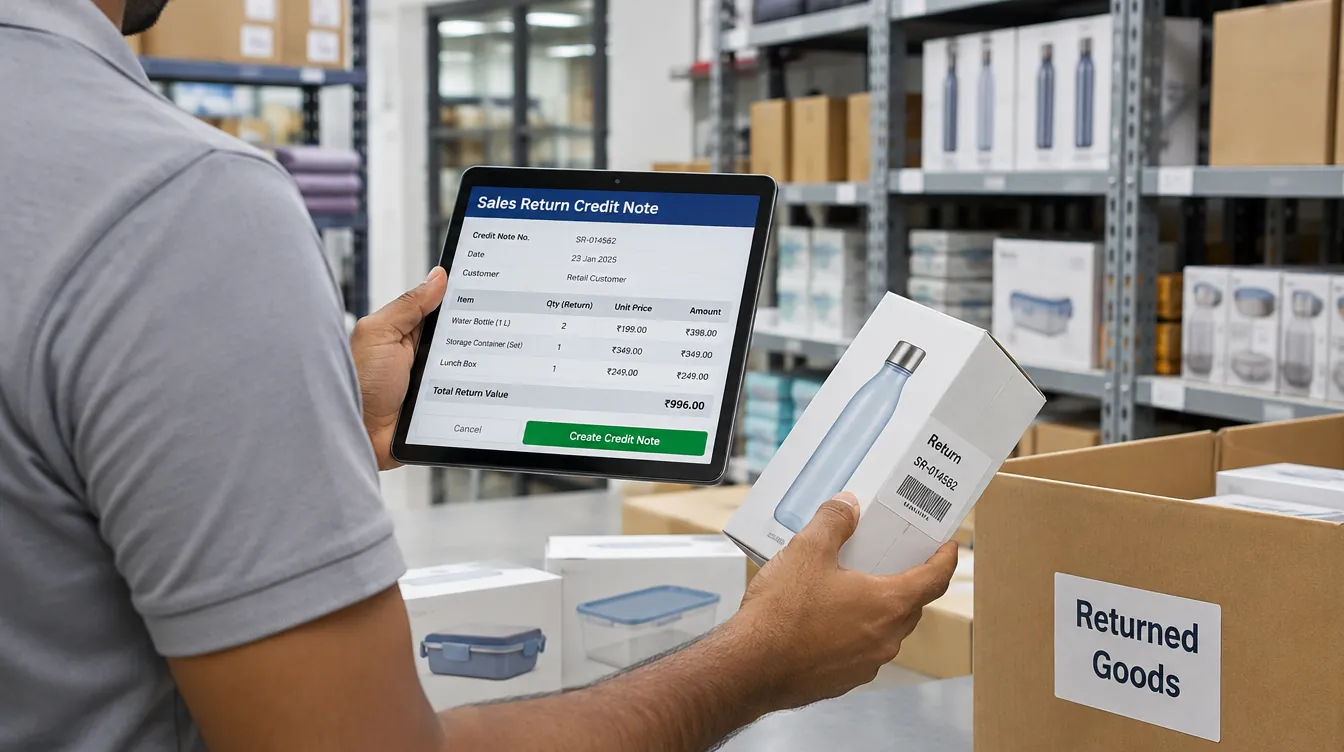
Credit Note Time Limit: The 30 November Deadline
A GST credit note must be declared in the return for the month it is issued, and no later than 30 November following the end of the financial year of the supply, or the date you file the annual return, whichever is earlier. That is the rule in Section 34(2), where "September" was replaced by "the thirtieth day of November" from 1 October 2022 by the Finance Act 2022 (CBIC).
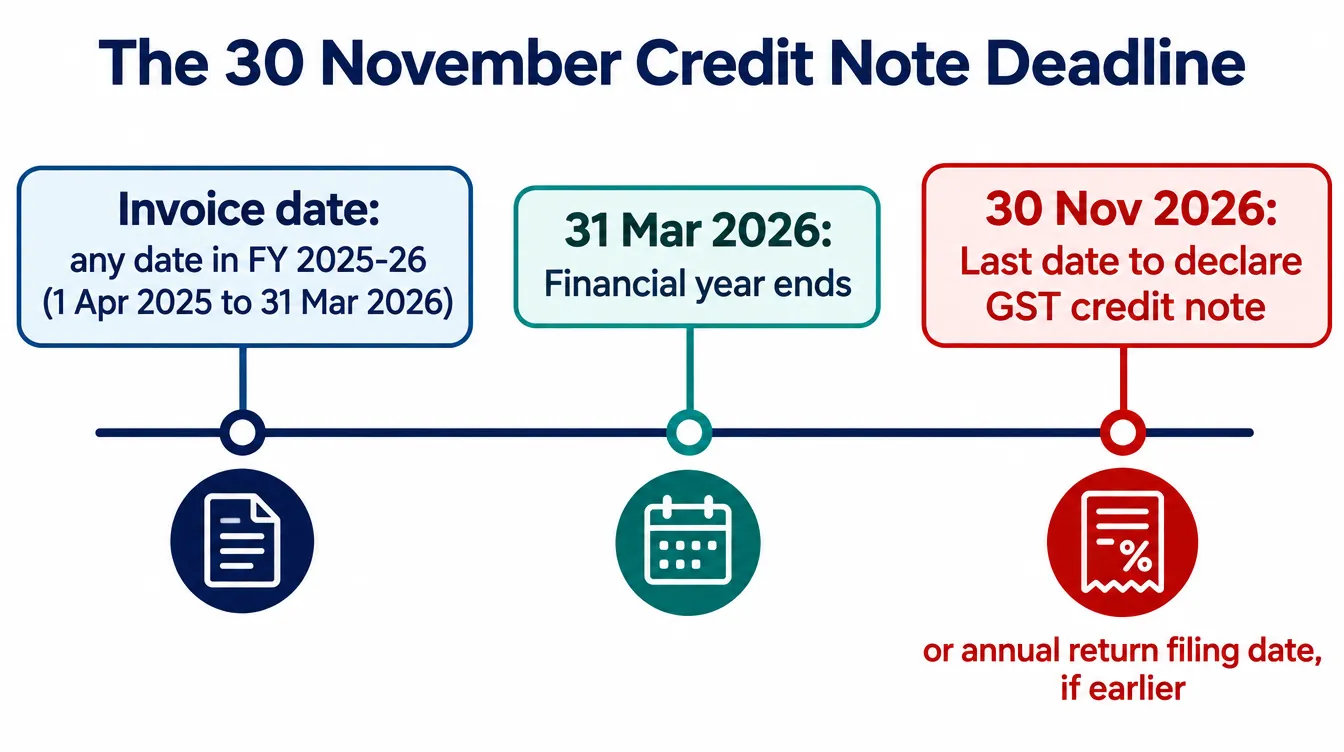
| Original invoice date | Financial year | Last date to declare the credit note |
|---|---|---|
| 10 May 2025 | FY 2025-26 | 30 November 2026 |
| 15 February 2026 | FY 2025-26 | 30 November 2026 |
| 20 April 2026 | FY 2026-27 | 30 November 2027 |
That means credit notes for FY 2025-26 supplies close on 30 November 2026, as GSTDost also notes for this cycle (GSTDost). If you file GSTR-9 early, the window closes on that date instead.
Miss it and you can still pass a commercial adjustment in your books, but the output tax reduction through the return may not be available, as Busy points out.
Reporting a Credit Note in GSTR-1, IMS and GSTR-3B
The supplier reports the credit note in GSTR-1, the buyer accepts, rejects or keeps it pending in the Invoice Management System (IMS), the buyer reverses the input tax credit in GSTR-3B, and only then does the supplier's output tax come down. One step out of order and the two sides stop matching.
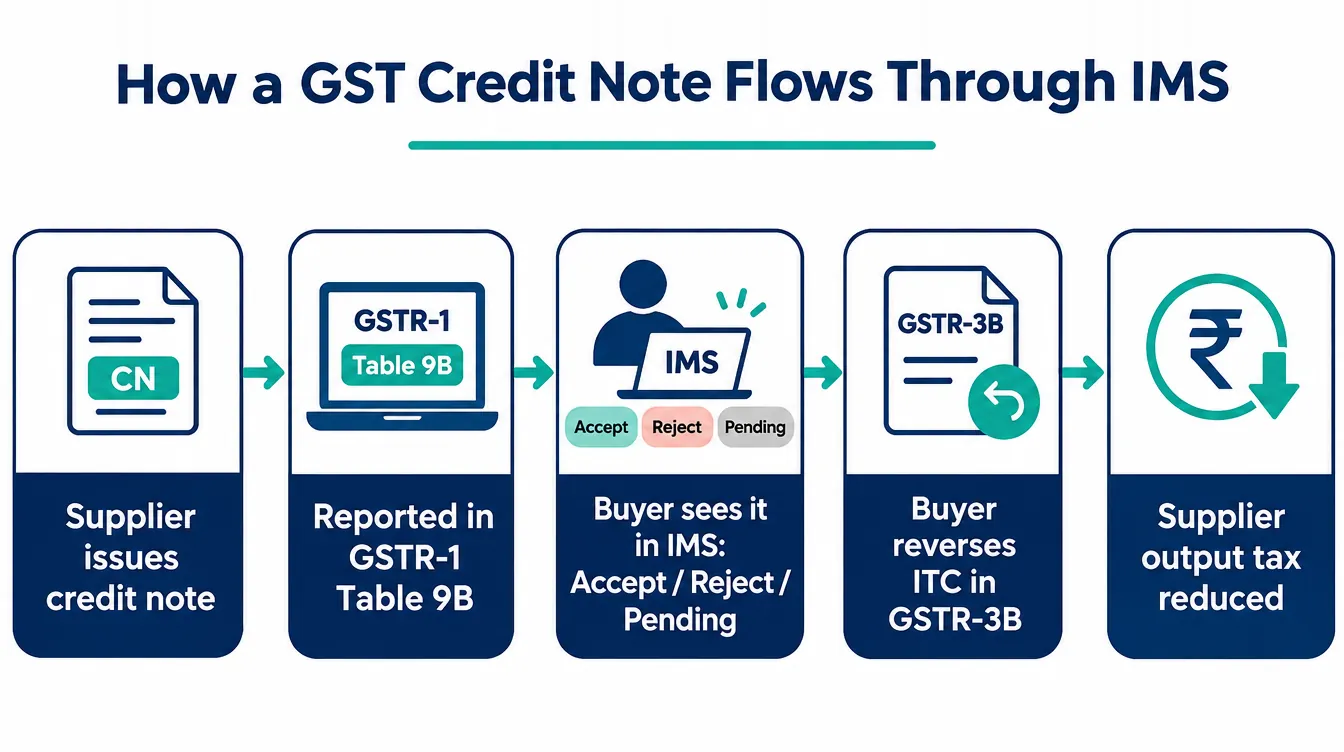
Which GSTR-1 table?
Credit notes to registered buyers go in Table 9B (CDNR). Credit notes to unregistered buyers go in Table 9B (CDNUR) when the original invoice was a B2C Large or export invoice, and otherwise are netted in Table 7. Amendments go in Table 9C, per the GST portal user guide.
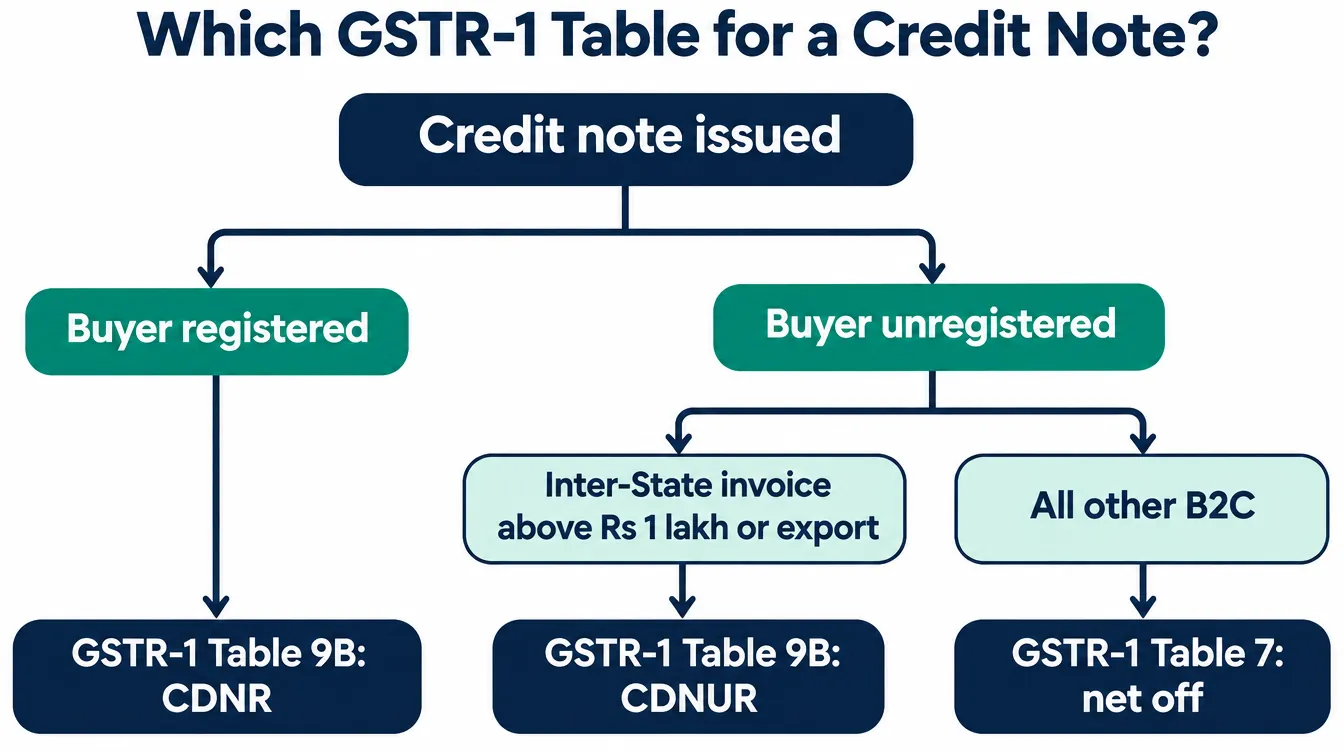
| Buyer | Original invoice | GSTR-1 table |
|---|---|---|
| Registered | Any B2B invoice | 9B, Credit/Debit Notes (Registered), CDNR |
| Unregistered | Inter-State invoice above ₹1 lakh (B2CL) | 9B, Credit/Debit Notes (Unregistered), CDNUR |
| Unregistered | Export invoice | 9B, CDNUR |
| Unregistered | Intra-State, or inter-State up to ₹1 lakh | Table 7, net of B2C supplies |
The B2CL limit dropped from ₹2.5 lakh to ₹1 lakh from 1 August 2024 (Tally), so older templates that still say ₹2.5 lakh send some notes to the wrong table. Zoho Books confirms that unregistered credit notes under ₹1 lakh sit in the consumer section instead (Zoho).
What the buyer does in IMS
In IMS, a buyer can accept, reject or keep a credit note pending. An accepted note flows into GSTR-2B and the buyer reverses the matching ITC in GSTR-3B. The reversal is shown under "ITC Reversed" in Table 4B of GSTR-3B (CAclubindia). From the October 2025 tax period, buyers can keep credit notes pending and declare the actual ITC to be reversed instead of reversing the full amount automatically (Busy, ICSI).
If the buyer rejects a valid credit note, the supplier's liability goes back up. Practitioners on TaxTMI advise re-reporting it through an amendment once the buyer agrees to accept. This is why the "ITC reversal confirmation" field in the templates matters: agree the credit note with the buyer before you upload it.
Credit Notes and E-Invoicing
If your business is covered by e-invoicing, credit notes to registered buyers need an IRN from the Invoice Registration Portal just like invoices. E-invoicing applies to taxpayers whose aggregate turnover crossed ₹5 crore in any year from 2017-18, notified from 1 August 2023 (Busy).
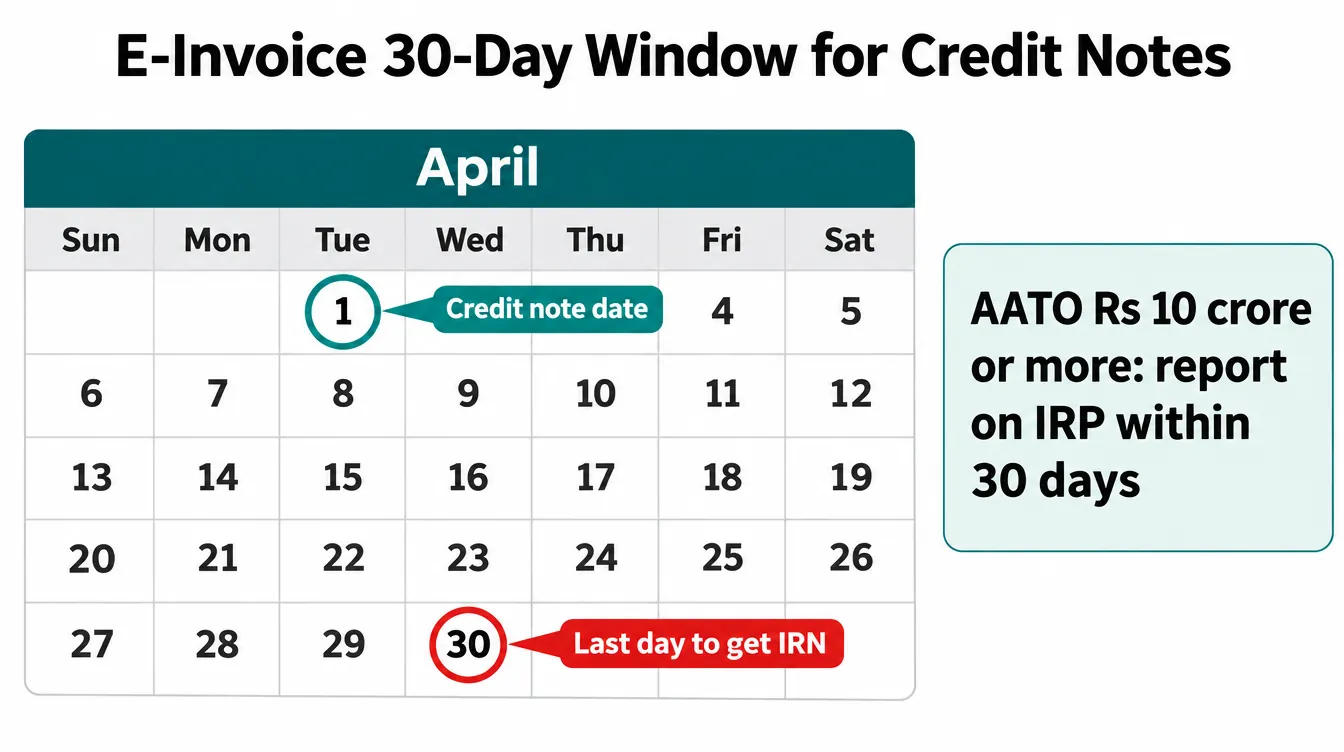
There is also a hard 30-day window. From 1 April 2025, businesses with annual aggregate turnover of ₹10 crore or more cannot report an invoice, credit note or debit note on the IRP more than 30 days after its date, following a GSTN advisory dated 5 November 2024 (Taxmann). A credit note dated 1 April must be reported by 30 April (KPMG).
So a credit note drafted in Excel and forgotten for five weeks is not just late. For a ₹10 crore business it can no longer get an IRN at all.
How to Make a Credit Note Format in Excel with a Deadline Check
A credit note format in Microsoft Excel can calculate tax, block GST on financial credit notes, work out the 30 November deadline from the invoice date, pick the GSTR-1 table and show the e-invoice due date, using a handful of formulas. It takes about 15 minutes to build once.
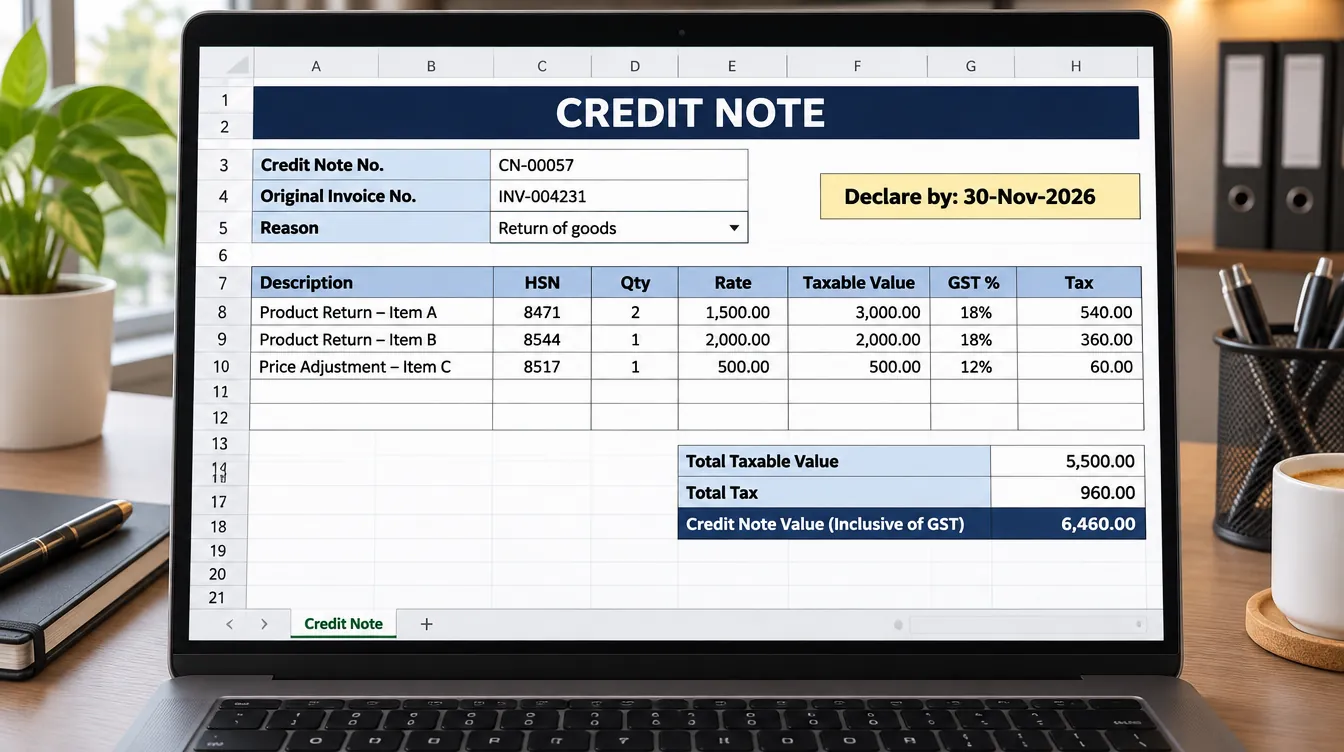
- Header. Rows 1 to 4: company name, address, your GSTIN in C5. "CREDIT NOTE" in bold, credit note number in G2, credit note date in G3, and in G4 type Yes or No for "AATO ₹10 crore or more?".
- Type and reason. In C7, Data > Data Validation > List:
GST - Sales return,GST - Discount,GST - Rate difference,GST - Excess tax,GST - Deficiency,Financial (no GST). - Buyer and invoice. Buyer GSTIN in C9 (leave blank if unregistered and type the state code in D9). Original invoice number in C10, invoice date in C11, original invoice value in C12.
- Item table from row 15. Columns: A Sr, B Description, C HSN, D Qty, E Unit, F Rate, G Taxable value, H GST %, I Tax. In G15:
=D15*F15. In I15:=IF(LEFT($C$7,3)="GST",G15*H15/100,0), so a financial credit note never shows tax. Copy down to row 24. - Totals. Taxable in G26:
=SUM(G15:G24). Tax in G27:=SUM(I15:I24). Credit note total in G28:=ROUND(G26+G27,0). - Last date to declare. In G30:
=DATE(IF(MONTH(C11)>=4,YEAR(C11)+1,YEAR(C11)),11,30). An invoice from April to December rolls to next year's 30 November; one from January to March uses the same year. In G31:=IF(G3>G30,"Too late for GST: issue a financial credit note","Within time"). Add red conditional formatting. - GSTR-1 table. In G32:
=IF(C9<>"","Table 9B CDNR",IF(AND(LEFT(C5,2)<>D9,C12>100000),"Table 9B CDNUR","Table 7 (net off B2C)")). The first two digits of a GSTIN are the state code (27 is Maharashtra). - E-invoice due date. In G33:
=IF(AND(G4="Yes",C9<>""),G3+29,"Not applicable"), so a note dated 1 April shows 30 April.
Set the print area, save as an Excel template (.xltx), and keep GST and financial credit notes in separate number series (CN/ and FCN/).
Prefer Word? A credit note format in Word works for low volumes. Build the item table and use Table Layout > Formula with =SUM(ABOVE) for totals, then press F9 to refresh, as Microsoft Support explains.
Using TallyPrime? Press Ctrl+F8 to open a Credit Note voucher (Tally help), or go to Alt+G > Create Voucher > F10 (Other Vouchers) > Credit Note (Tally help). Tally's own print layout becomes your credit note format in Tally.
8 Credit Note Format Samples (Copy-Paste Ready)
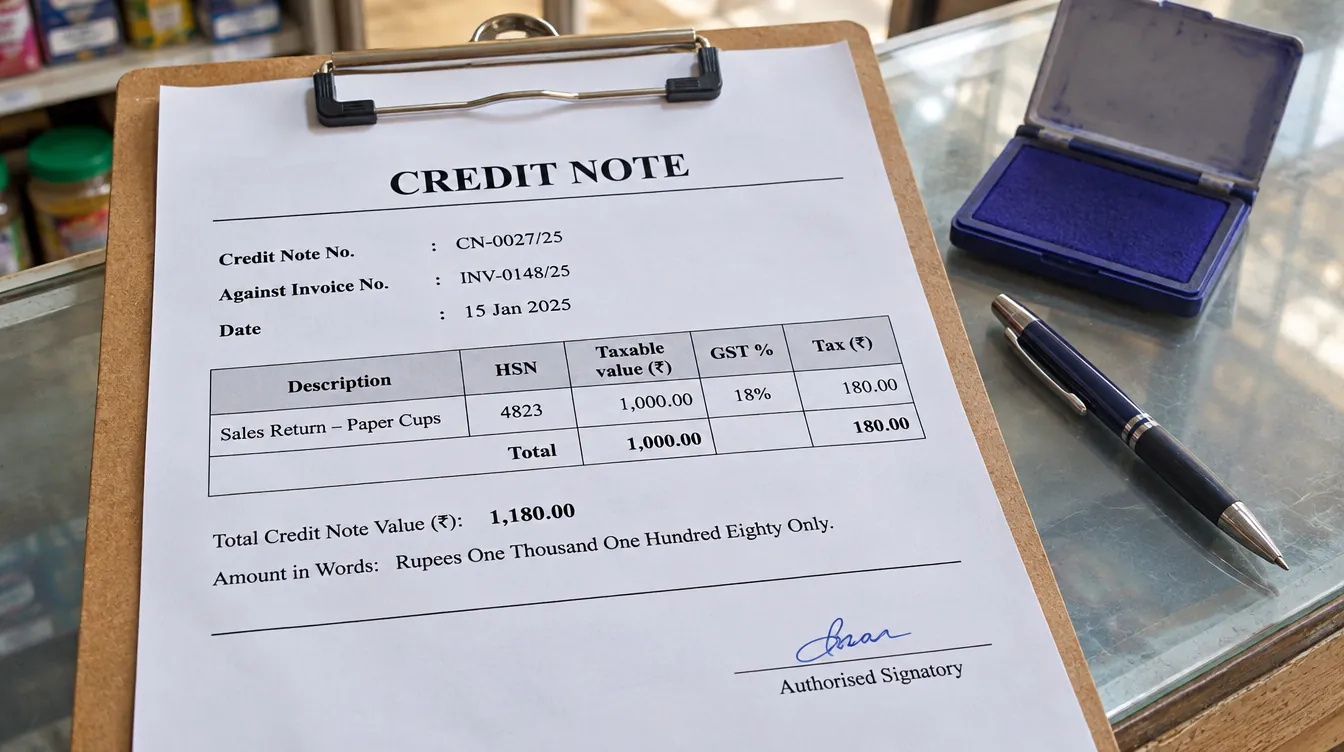
Each sample below can be pasted into Word or Excel. Replace the [bracketed] fields, add your letterhead, and always quote the original invoice.
1. Standard GST Credit Note Format (Sales Return)
When to use: A registered buyer returns goods against a tax invoice.
[Supplier Company Legal Name]
[Address, City, State, PIN] · GSTIN: [27XXXXX0000X1Z5] · Phone: [ ]
CREDIT NOTE (Section 34, CGST Act)
Credit Note No.: [CN/26-27/0001] · Date: [DD/MM/YYYY] · Reason: Sales return
Against Invoice No.: [INV/26-27/0412] · Invoice date: [DD/MM/YYYY] · Return GRN No.: [ ]
Recipient: [Buyer Name, Address] · GSTIN: [ ] · Place of supply: [State, code]
| Sr | Description | HSN | Qty returned | Unit | Rate (₹) | Taxable value (₹) | GST % | Tax (₹) |
|---|---|---|---|---|---|---|---|---|
| 1 | [Item, size, grade] | [0000] | [ ] | [Nos] | [ ] | [ ] | 18 | [ ] |
| 2 | [Item] | [0000] | [ ] | [Kg] | [ ] | [ ] | 18 | [ ] |
| Total | [ ] | [ ] |
Tax credited: CGST ₹[ ] + SGST ₹[ ] / IGST ₹[ ] · Total credit: ₹[ ] (Rupees [ ] only)
Recipient to reverse input tax credit of ₹[ ] in GSTR-3B. Last date to declare: 30/11/[YYYY].
For [Supplier Company Legal Name]
[Authorised signature]
Acknowledged by recipient: Signature __________ Date __________
2. Simple Credit Note Format
When to use: Small businesses and service providers who want a clean layout that still meets Rule 53(1A).
[Business Name] · [Address] · GSTIN: [ ]
CREDIT NOTE
Credit Note No.: [ ] · Date: [ ] · Against Invoice No.: [ ] dated [ ]
To: [Name, Address, GSTIN if registered]
| Sr | Description | HSN/SAC | Taxable value (₹) | GST % | Tax (₹) |
|---|---|---|---|---|---|
| 1 | [ ] | [ ] | [ ] | [ ] | [ ] |
| Total | [ ] | [ ] |
Reason: [Return / deficiency / excess billing]
For [Business Name]
[Signature]
3. Post-Sale Discount Credit Note Format
When to use: Turnover discounts, rebates and schemes given after billing. From 1 November 2026 no prior agreement is needed, but the buyer must reverse ITC.
[Supplier Company Legal Name] · GSTIN: [ ]
CREDIT NOTE: POST-SALE DISCOUNT (Section 15(3)(b) and Section 34, CGST Act)
Credit Note No.: [CN/26-27/0002] · Date: [ ] · Scheme / period: [Q3 FY 2026-27 turnover discount]
Recipient: [Dealer Name, Address] · GSTIN: [ ] · Place of supply: [State]
| Sr | Invoice No. | Invoice date | Invoice taxable value (₹) | Discount % | Discount (₹) | GST % | Tax credited (₹) |
|---|---|---|---|---|---|---|---|
| 1 | [ ] | [ ] | [ ] | 2 | [ ] | 18 | [ ] |
| 2 | [ ] | [ ] | [ ] | 2 | [ ] | 18 | [ ] |
| Total | [ ] | [ ] |
Condition: GST is reduced only if the recipient reverses input tax credit of ₹[ ] in GSTR-3B. If not, this discount will be treated as a financial credit note.
For [Supplier]
[Signature] · ITC reversal confirmed by recipient: __________ Date: __________
4. Rate Difference or Excess Billing Credit Note Format
When to use: Wrong rate, short supply, wrong tax rate or a price cut agreed for damaged goods.
[Supplier Company Legal Name] · GSTIN: [ ]
CREDIT NOTE: [RATE DIFFERENCE / SHORT SUPPLY / EXCESS TAX]
Credit Note No.: [ ] · Date: [ ] · Against Invoice No.: [ ] dated [ ]
Recipient: [Name, Address, GSTIN]
| Sr | Description | HSN | Qty | Rate billed (₹) | Correct rate (₹) | Difference value (₹) | GST % | Tax (₹) |
|---|---|---|---|---|---|---|---|---|
| 1 | [ ] | [ ] | [ ] | [ ] | [ ] | [ ] | [ ] | [ ] |
For excess tax only: Tax charged [18%] ₹[ ] · Correct tax [5%] ₹[ ] · Tax credited ₹[ ]
For [Supplier]
[Signature]
5. Credit Note Format for an Unregistered Customer
When to use: Retail customers and walk-in buyers returning goods. Rule 53(1A) asks for the delivery address and State name and code when the buyer has no GSTIN.
[Store / Company Legal Name] · [Outlet address] · GSTIN: [ ]
CREDIT NOTE
Credit Note No.: [CN/26-27/0003] · Date: [ ] · Against Invoice / Bill No.: [ ] dated [ ]
Customer: [Name] · Address: [Delivery address] · State: [Maharashtra] · State code: [27] · Phone: [ ]
| Sr | Item | HSN | Qty | Taxable value (₹) | GST % | Tax (₹) |
|---|---|---|---|---|---|---|
| 1 | [ ] | [ ] | [ ] | [ ] | [ ] | [ ] |
| Total | [ ] |
Refund mode: [Cash / UPI / adjusted against Bill No.]
For [Store]
[Signature] · Customer signature: __________
6. Financial (Commercial) Credit Note Format, No GST
When to use: A commercial discount where the buyer will not reverse ITC, a goodwill gesture, or a reduction after the 30 November deadline.
[Supplier Company Legal Name] · GSTIN: [ ]
FINANCIAL CREDIT NOTE (NOT A CREDIT NOTE UNDER SECTION 34 OF THE CGST ACT)
Credit Note No.: [FCN/26-27/0001] · Date: [ ] · Reference Invoice No.: [ ] dated [ ]
Recipient: [Name, Address, GSTIN]
| Sr | Particulars | Amount (₹) |
|---|---|---|
| 1 | [Commercial discount for Q3 / goodwill credit] | [ ] |
| Total credit | [ ] |
No GST is adjusted. The tax charged on the original invoice remains unchanged.
For [Supplier]
[Signature]
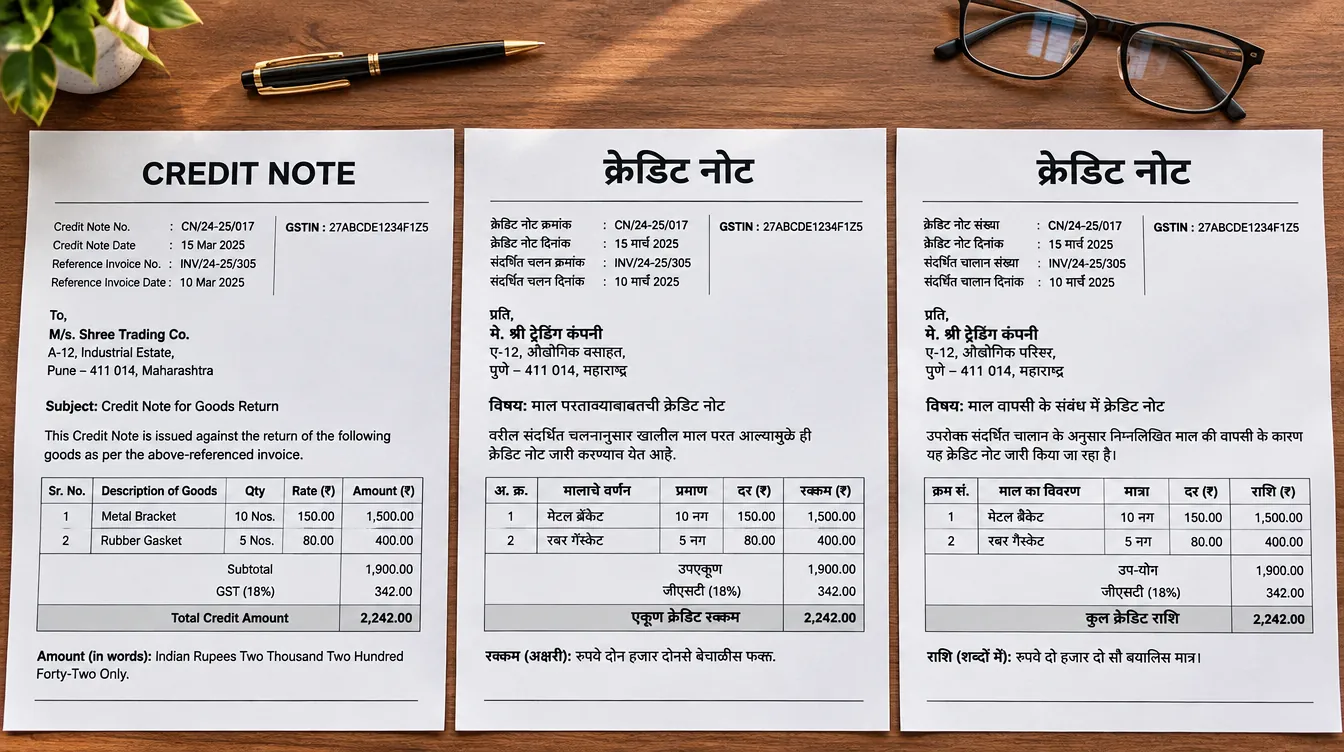
7. Credit Note Format in Marathi (क्रेडिट नोट)
When to use: Dealers, distributors and retailers in Maharashtra. Keep GSTIN, HSN, invoice numbers and amounts in English digits so they match the GST portal.
[कंपनीचे नाव] · [पत्ता] · GSTIN: [ ]
क्रेडिट नोट (CREDIT NOTE)
क्रेडिट नोट क्र.: [ ] · दिनांक: [ ] · कारण: [माल परत / सूट / दरातील फरक]
मूळ इनव्हॉइस क्र.: [ ] · इनव्हॉइस दिनांक: [ ]
प्रति: [नाव, पत्ता] · GSTIN: [ ] · राज्य व कोड: [महाराष्ट्र, 27]
| अ.क्र. | मालाचे वर्णन | HSN | नग | करपात्र मूल्य (₹) | GST % | कर (₹) |
|---|---|---|---|---|---|---|
| 1 | [ ] | [ ] | [ ] | [ ] | [ ] | [ ] |
| एकूण | [ ] | [ ] |
खरेदीदाराने ₹[ ] इतके इनपुट टॅक्स क्रेडिट GSTR-3B मध्ये रिव्हर्स करावे.
[कंपनीचे नाव] करिता
[सही व शिक्का]
8. Credit Note Format in Hindi (क्रेडिट नोट)
When to use: Hindi-speaking dealers, distributors and customers.
[कंपनी का नाम] · [पता] · GSTIN: [ ]
क्रेडिट नोट (CREDIT NOTE)
क्रेडिट नोट सं.: [ ] · दिनांक: [ ] · कारण: [माल वापसी / छूट / दर अंतर]
मूल इनवॉइस सं.: [ ] · इनवॉइस दिनांक: [ ]
सेवा में: [नाम, पता] · GSTIN: [ ] · राज्य व कोड: [ ]
| क्र.सं. | विवरण | HSN | मात्रा | कर योग्य मूल्य (₹) | GST % | कर (₹) |
|---|---|---|---|---|---|---|
| 1 | [ ] | [ ] | [ ] | [ ] | [ ] | [ ] |
| कुल | [ ] | [ ] |
क्रेता ₹[ ] का इनपुट टैक्स क्रेडिट GSTR-3B में रिवर्स करें।
[कंपनी का नाम] के लिए
[हस्ताक्षर और मुहर]
Common Credit Note Mistakes
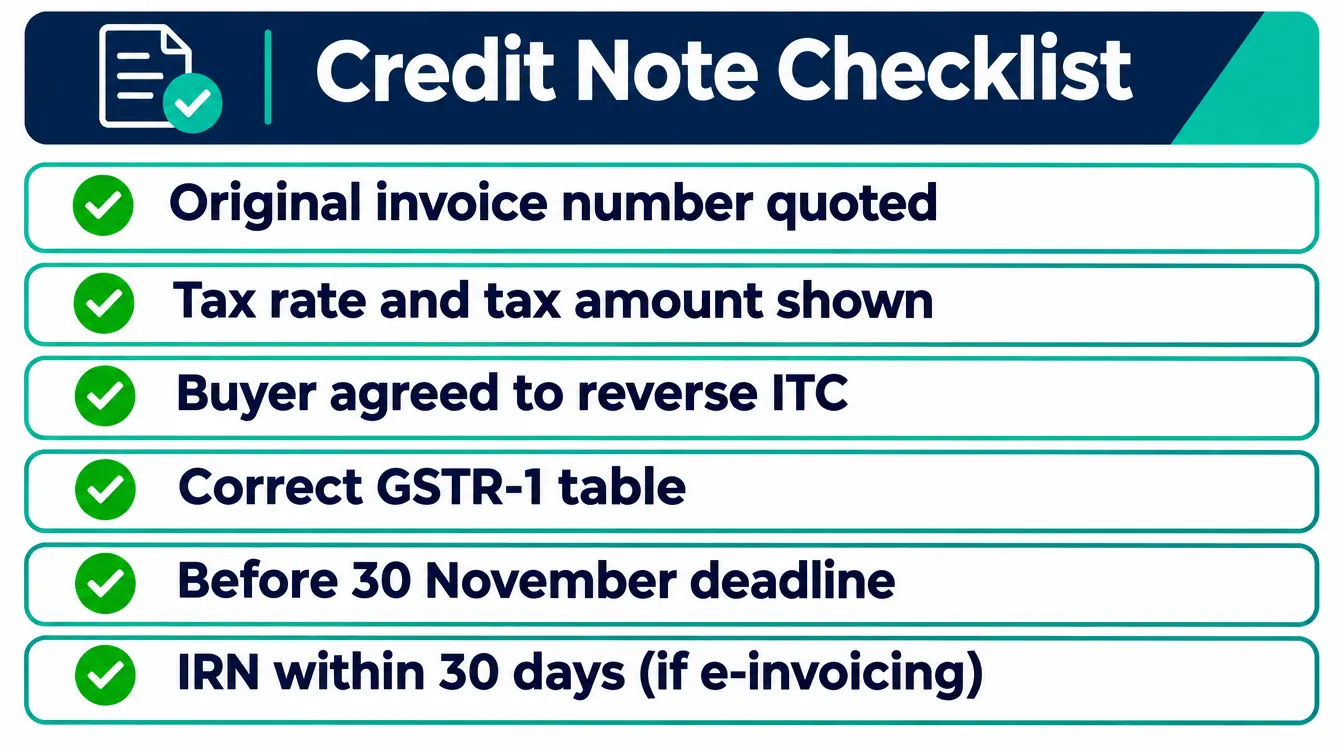
Most credit note problems come from issuing a GST credit note the buyer never reverses, reporting it in the wrong table, or issuing it after the deadline.
| Mistake | What happens | Fix |
|---|---|---|
| GST credit note issued, buyer does not reverse ITC | Supplier cannot reduce output tax (Section 34(2) proviso) | Agree first; else issue a financial credit note |
| No original invoice number | Note fails Rule 53(1A) | Quote every invoice it adjusts |
| Tax columns left out | Rate and tax amount are required particulars | Show rate and tax line by line |
| Credit note after 30 November for last year's sale | No GST reduction in the return | Financial credit note only |
| Unregistered note under ₹1 lakh put in CDNUR | GSTR-1 mismatch | Net it in Table 7 |
| Old ₹2.5 lakh B2CL limit in your template | Notes in the wrong table since August 2024 | Update to ₹1 lakh |
| E-invoice credit note not uploaded within 30 days (₹10 crore+) | IRP refuses the IRN | Report on the day of issue |
| Using a credit note to raise the price | Wrong document | Issue a debit note |
| GST and financial notes in one number series | Confusion in GSTR-1 and audit | Separate series: CN/ and FCN/ |
When Spreadsheet Credit Notes Stop Working
A credit note in Word or Excel works until you have dozens of returns, schemes and rate corrections a month across outlets and dealers, and nobody can say which notes the buyer has accepted in IMS or which close on 30 November. Then the same data gets typed into the note, the register, GSTR-1 and the dealer ledger.
Mera Udyog keeps leads, the product catalog, quotations, sales orders and invoices in one app, built for manufacturing units and multi-outlet retail chains.
To keep returned stock in sync across outlets and godowns, see our guide to inventory management software.
Looking for other business formats? See all our free business templates.
Issue Your Next Credit Note the Right Way
Before every credit note, run the 3-Gate Credit Note Test: is there a Section 34 ground, will the buyer reverse the ITC, and are you before 30 November? If all three say yes, issue a GST credit note. If not, use the financial one.
If your team handles more returns, schemes and dealers than a spreadsheet can track, start a 7-day free trial of Mera Udyog, or book a free demo. See pricing.
These templates are general information, not legal or tax advice. Confirm GST treatment, deadlines and ITC reversal with your CA.
FAQ: Credit Note Format
What is the format of a credit note under GST?
There is no fixed government layout. A GST credit note format must show the supplier's name, address and GSTIN, the words "Credit Note", a serial number of up to 16 characters, date, recipient details, the original invoice number and date, taxable value, tax rate, tax credited and a signature, as Rule 53(1A) of the CGST Rules requires.
When can a credit note be issued under GST?
A credit note can be issued under Section 34(1) when the invoice value or tax was higher than payable, goods are returned, goods or services are deficient, and, from 1 November 2026, for post-sale discounts under Section 15(3)(b) where the buyer reverses the input tax credit.
What is the time limit for a credit note?
A credit note must be declared by 30 November following the end of the financial year of the supply, or by the annual return filing date if that is earlier. For FY 2025-26 supplies, the last date is 30 November 2026.
Does the buyer have to reverse ITC on a credit note?
Yes, for a registered buyer. Since 1 October 2025, the supplier cannot reduce output tax on a credit note unless the buyer has reversed the input tax credit linked to it, under the amended proviso to Section 34(2).
What is a financial credit note?
A financial or commercial credit note reduces the amount the buyer owes without changing the GST on the original invoice. Use it when the buyer will not reverse input tax credit, for goodwill credits, or after the 30 November deadline.
Where is a credit note reported in GSTR-1?
Credit notes to registered buyers go in Table 9B (CDNR). Credit notes to unregistered buyers go in Table 9B (CDNUR) when the original invoice was an inter-State invoice above ₹1 lakh or an export, and are otherwise netted in Table 7.
Can one credit note cover multiple invoices?
Yes. Section 34(1) allows one or more credit notes for the supplies of a financial year, and Rule 53(1A) asks for the serial numbers and dates of the corresponding invoices, so list every invoice the note adjusts.
How do I make a credit note format in Excel?
Build an item table with Qty, Rate, Taxable value, GST % and Tax, add a type dropdown so financial credit notes show no tax, and use =DATE(IF(MONTH(invoice date)>=4,YEAR(invoice date)+1,YEAR(invoice date)),11,30) to show the last date to declare the credit note.
About the Author
Written by the Mera Udyog team, who build billing and ERP software for manufacturers and retail chains.
Sources
- Section 34, CGST Act 2017: credit and debit notes, CBIC
- Rule 53, CGST Rules 2017: revised tax invoice and credit or debit notes, CBIC
- Credit note in GST flier, CBIC
- Finance Act 2025, Section 126: amendment of Section 34, Income Tax Department
- Circular No. 253/10/2025-GST withdrawing Circular 212/6/2024-GST, TaxGuru, October 2025
- New GST rules for post-supply discounts from 1 November 2026, GSTDost, November 2026
- New provisions on post-sale discounts, credit notes and refunds from 1 November, Taxscan, October 2026
- Credit note under GST: meaning, format, rules and ITC treatment, Busy, July 2026
- Credit note must show tax rate and tax amount, Business Standard, 2018
- GSTR-1 tables 9B CDNR, CDNUR and 9C, GST portal
- B2C Large threshold revised to ₹1 lakh, Tally Solutions
- Credit notes for unregistered customers in GSTR-1, Zoho Books
- IMS pending option and ITC reduction for credit notes, ICSI, November 2025
- 30-day e-invoice reporting limit for AATO ₹10 crore and above, Taxmann, November 2024
- New group of taxpayers required to report invoices within 30 days, KPMG, December 2024
- Credit note ITC reversal in GSTR-3B Table 4B, CAclubindia, 2025
- Use a formula in a Word table, Microsoft Support