By Mera Udyog Team · Last updated: November 2, 2026

Leads come in from everywhere. IndiaMART, Facebook ads, WhatsApp, missed calls, the stall at last month’s expo.
And somehow, half of them never get a proper follow-up.
The fix isn’t more leads. It’s a lead management system that catches every enquiry, gives it an owner and makes sure someone calls back fast.
In this guide, you’ll learn:
- How lead tracking works in practice (using our 6R Lead Flow)
- What lost leads actually cost you, with a simple calculator
- 8 lead management tools available in India, with prices
- What the DPDP Act means for your lead data
A lead management system is software that captures enquiries from every source, assigns each one to a salesperson, tracks every call and follow-up, and shows which leads turn into customers. It replaces scattered Excel sheets, notebooks and WhatsApp chats with one list, so no enquiry is forgotten and owners can see where sales stall.
Quick answer: lead management system (November 2026)
- Lead management software captures, assigns, tracks and reports on every enquiry in one place.
- Speed matters: firms that contacted web leads within an hour were nearly 7 times as likely to qualify them, according to a 2011 Harvard Business Review study of 2,241 companies.
- Indian lead sources such as IndiaMART, Meta lead ads and WhatsApp each need their own connection into the system.
- Paid lead management software in India starts around ₹400 per user per month (Bigin by Zoho, annual billing); HubSpot’s CRM is free for up to 2 users.
- India’s DPDP Act notice and consent obligations take full effect from May 2027, so lead data needs a clear consent trail.
What Is a Lead Management System?
Lead management software is the tool that runs your lead management process from first enquiry to closed sale. It records who enquired, where they came from, who owns the lead, what was said on each call, and what happens next.
Think of it as a register for enquiries. Except this register sends reminders, counts calls, and tells you which source brings buyers instead of time-wasters.
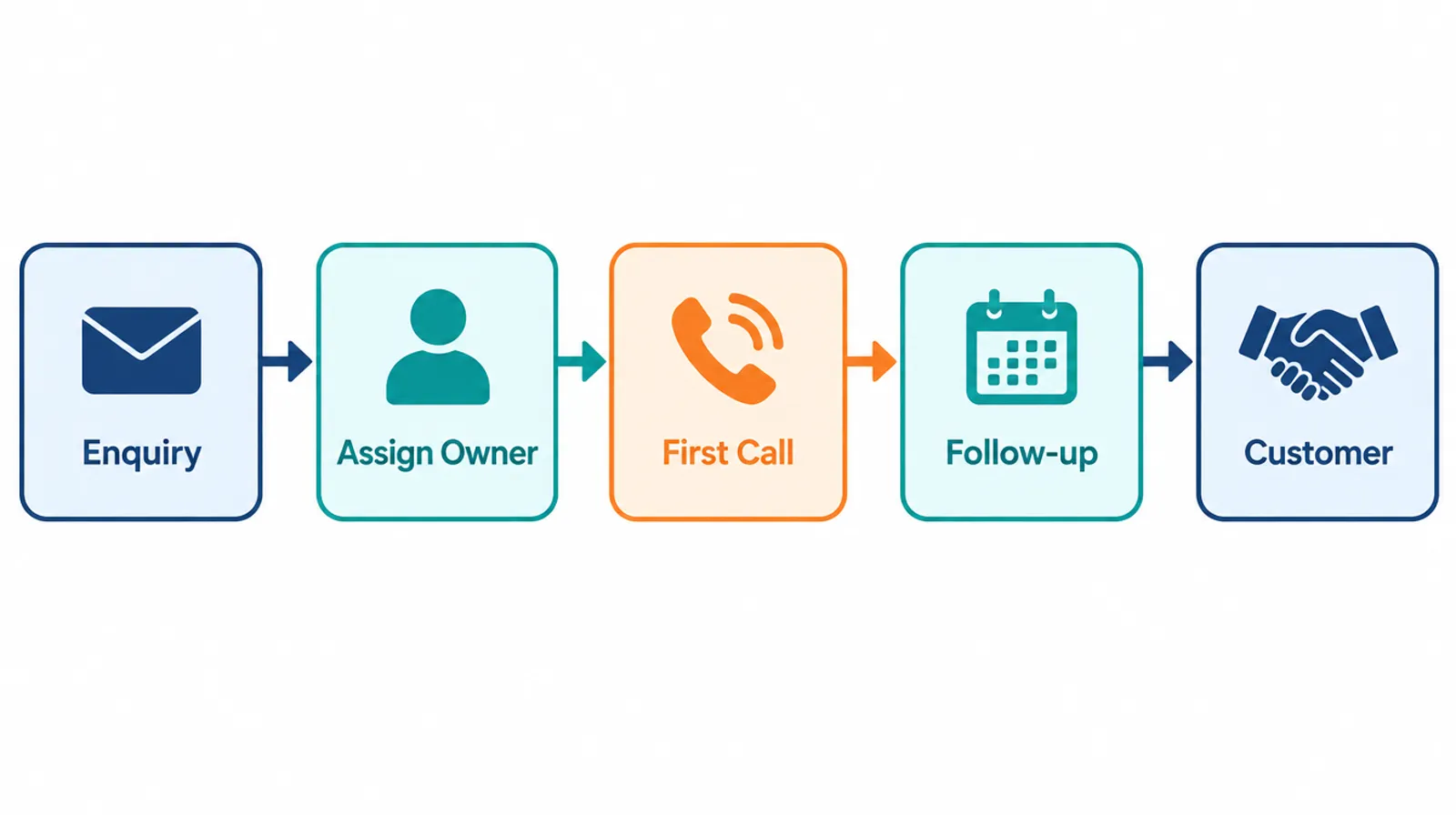
Here’s the basic flow:
- A lead arrives from a form, ad, marketplace, call or WhatsApp message.
- The system records it with the source, product interest and contact details.
- It assigns an owner based on rules (city, product, round-robin).
- The salesperson calls, logs the outcome and sets the next follow-up date.
- The owner sees reports: response time, conversion rate by source, overdue follow-ups.
If you’re comparing full CRMs rather than lead tools alone, our guide to the best CRM software in India compares 10 options with real team costs.
Lead Management System vs CRM: What’s the Difference?
A lead management system handles the stage before someone becomes a customer: capture, assignment, calling and qualification. A CRM covers the whole customer relationship, including deals, quotations, orders, repeat purchases and service. Most modern CRMs include lead management, which is why people search for “lead management CRM”.
| Lead management system | CRM | |
|---|---|---|
| Main job | Turn enquiries into qualified prospects | Manage customers for life |
| Starts at | First enquiry | First enquiry |
| Ends at | Qualified lead or first sale | Never (repeat sales, service) |
| Typical features | Lead capture, routing, call tracking, follow-up reminders, source reports | All of those, plus deals, quotations, orders, invoices, support |
| Best for | Teams drowning in enquiries | Teams that also manage repeat customers |
Bottom line: if your problem is “we get enquiries but don’t follow up properly”, start with lead management. If your problem also includes quotations, orders and payment follow-ups, you need a CRM that does both.
Why Response Speed Decides Who Wins the Lead
Response speed is the single biggest reason lead management software pays for itself. Buyers enquire with three or four sellers at once, and the first one to call usually sets the price conversation.
The research backs this up:
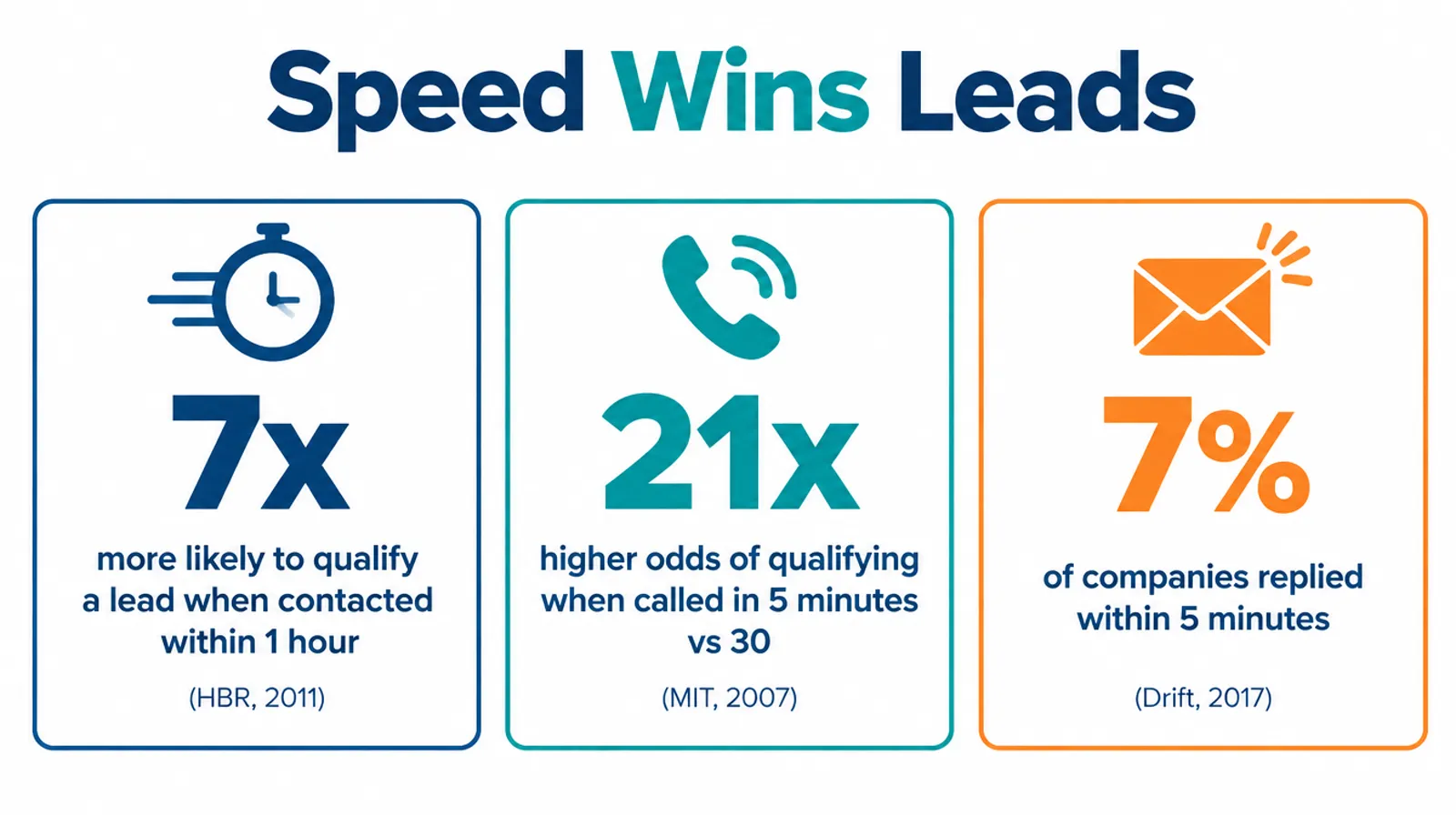
- Harvard Business Review (2011): an audit of 2,241 US companies found that firms contacting web leads within an hour were nearly 7 times as likely to qualify them as firms that waited even one more hour. Only 37% of companies responded within an hour, and the average response time was 42 hours (HBR).
- MIT / InsideSales Lead Response Management study (2007): calling within 5 minutes instead of 30 minutes increased the odds of qualifying a lead 21 times, across 15,000+ leads (MIT study PDF).
- Drift (2017): in a test of 433 B2B companies, only 7% responded within 5 minutes and 55% didn’t respond within 5 business days (Drift, archived).
These are US studies, and some are over a decade old. But anyone who has bought from IndiaMART knows the pattern holds: the first supplier to call gets the conversation.
Note
No software makes your team call faster on its own. It makes slow calls visible. That visibility is what changes behaviour.
For example, Sidheshwarr RMC in Nagpur, which runs 3 ready-mix concrete plants and a head office with 200+ staff, tracks its sales calls through Mera Udyog’s SIM-based call analytics and captures every incoming enquiry in the CRM. Director Partth Jaishwall puts it simply: “Six months in, I do not know how we managed before it.” (Sidheshwarr RMC case study)
Where Indian Leads Come From (and How Each Gets Into Your System)
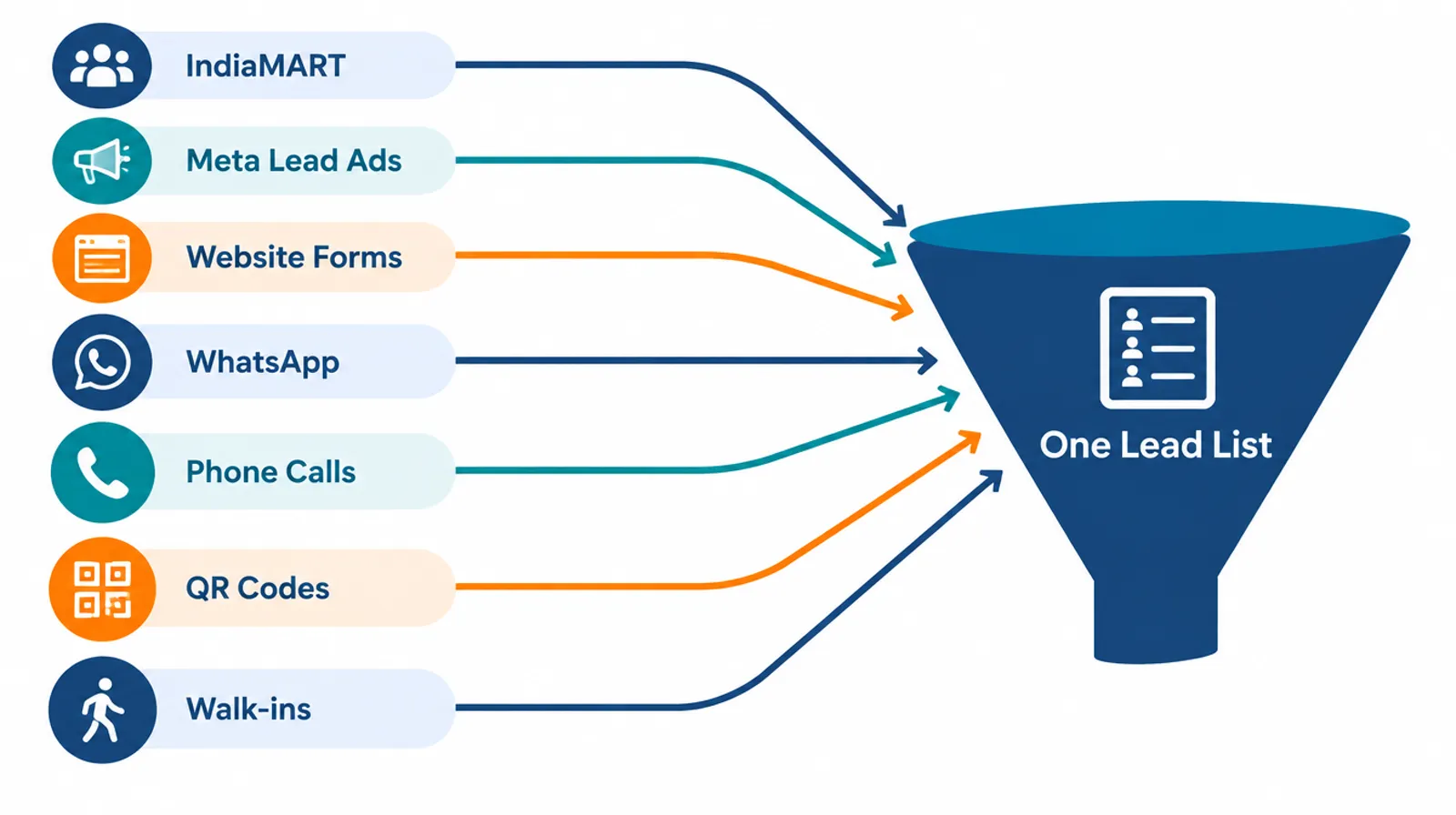
Indian small businesses typically get leads from 6 to 8 channels at once, and each one enters your lead software differently. Most guides treat “lead capture” as one feature. In practice, every source has its own connection method and its own catch.
| Lead source | How it gets into the system | The catch |
|---|---|---|
| IndiaMART | IndiaMART’s Lead Manager Pull API, or a native CRM connector | API is for paid sellers only, self-setup, and can be called at most once every 5 minutes |
| Meta lead ads (Facebook, Instagram) | Direct CRM integration or a connector tool | Leads go cold fast if they only sit in Meta’s form downloads |
| Website forms | Form sends data straight to the CRM | Spam entries need filtering |
| WhatsApp Business API connection, or manual entry | Chats on staff phones stay invisible without integration | |
| Phone calls and missed calls | Call tracking from staff SIMs or a cloud telephony number | Untracked personal-phone calls are the biggest blind spot |
| QR codes and links (stalls, catalogues, packaging) | QR opens a form that creates a lead | Needs a short form, or people abandon it |
| Walk-ins and referrals | Manual entry on the mobile app | Only works if entry takes under 30 seconds |
IndiaMART deserves a special mention. The platform delivered 27 million unique business enquiries in the quarter ended September 30, 2026 (IndiaMART results filing).
Its Pull API documentation says the API is a do-it-yourself service for paying sellers, each request covers at most 7 days of data, and hitting it more than once in 5 minutes returns an error. So ask any vendor exactly how their IndiaMART sync works, and how often.
Pro tip
Tag every lead with its source from day one. After 60 days, you’ll know which channel actually brings buyers, and you can cut spend on the rest.
For Mera Udyog users, enquiries can also come in from QR codes and links, which works well for trade-fair stalls and printed catalogues (Mera Udyog CRM).
The 6R Lead Flow: How a Lead Management System Works
The 6R Lead Flow is a six-step model of what lead management software should do with every enquiry: Record, Route, Reach, Rate, Remind and Report. If a tool skips any one of the six, leads leak at that step.
- Record: capture the lead automatically with source, contact and product interest. No retyping from WhatsApp screenshots.
- Route: assign an owner instantly, by city, product line, language or round-robin.
- Reach: make the first call fast, and log it. Call tracking shows whether the call actually happened.
- Rate: qualify the lead as hot, warm or cold (or use a lead scoring rule), so the team calls the best leads first.
- Remind: set a dated next step after every call. The system nags until it’s done.
- Report: review response time, conversion by source and overdue follow-ups every week.
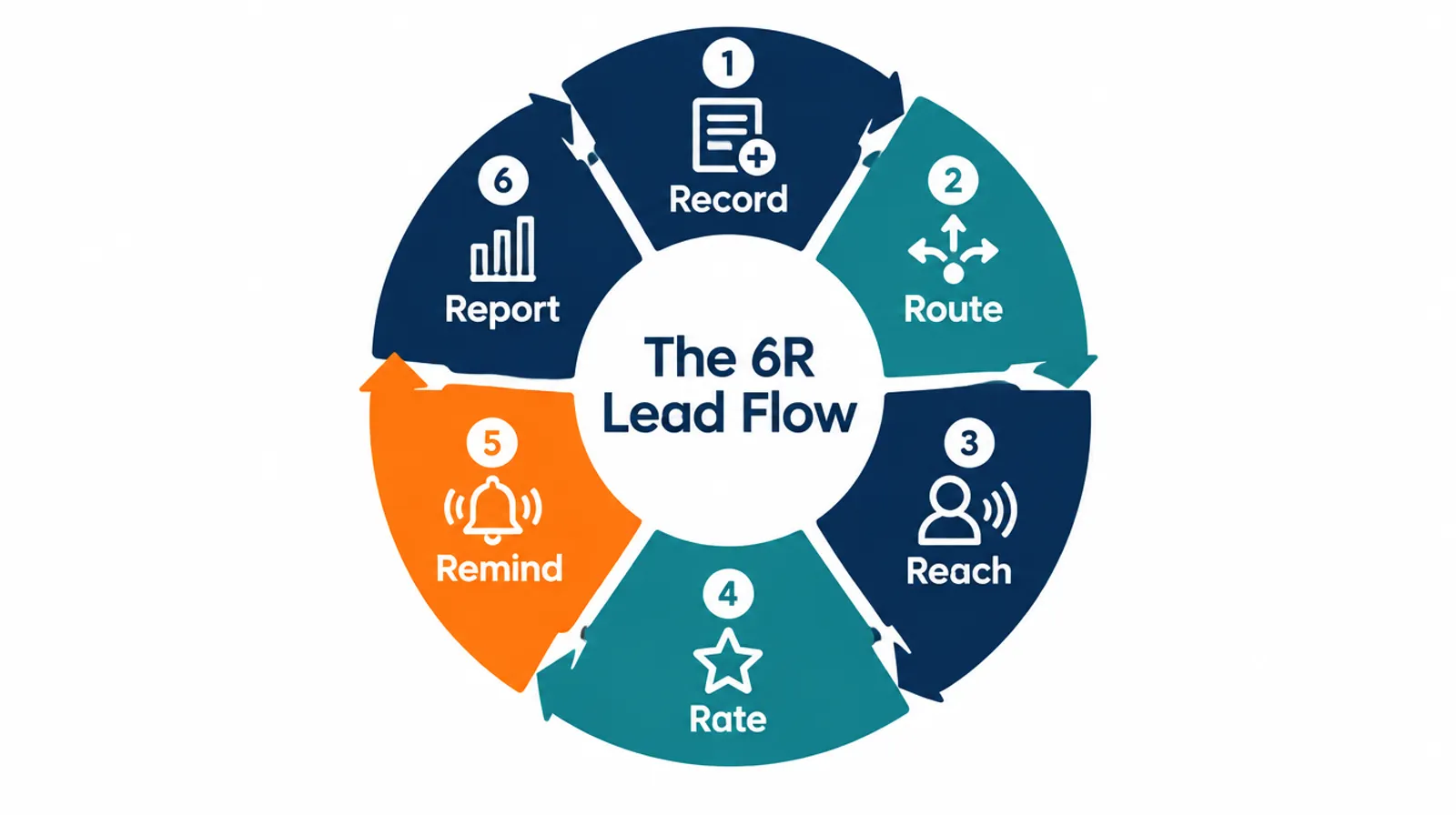
The R most businesses skip? Remind. A lead that says “call me next week” is still a lead. Without a dated reminder, it quietly dies.
8 Must-Have Features in Lead Management Software
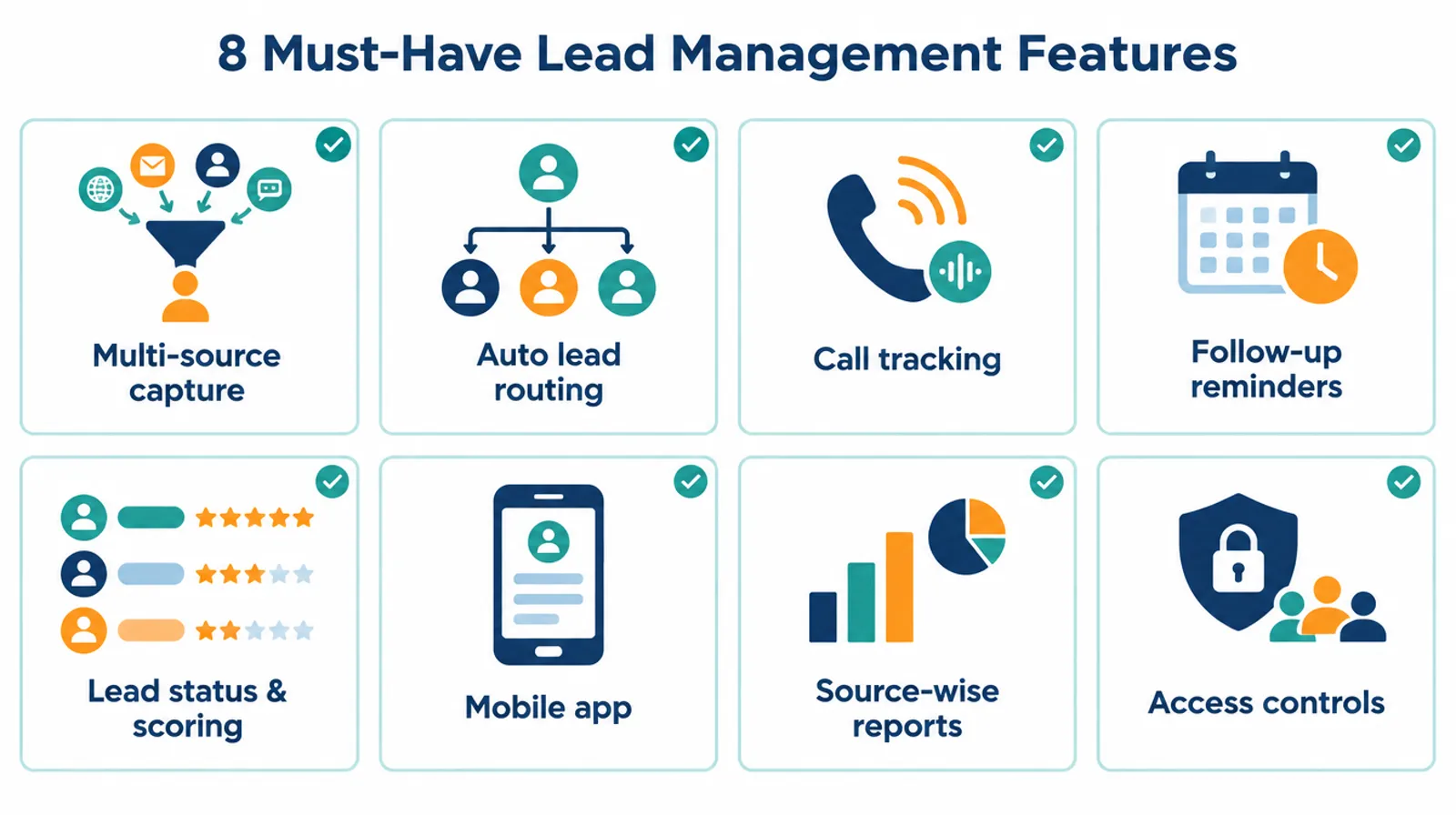
Good lead management software needs eight core features: multi-source lead capture, automatic routing, call tracking, follow-up reminders, lead status and scoring, a mobile app, source-wise reports, and access controls. Here’s what to check for each.
1. Multi-source lead capture
Every channel from the table above should land in one list automatically. Ask the vendor to show IndiaMART, Meta and website leads arriving live in the demo.
2. Automatic lead routing
Lead routing rules should assign leads without a manager forwarding them. Round-robin, by city, or by product are the common options.
3. Call tracking (SIM or cloud)
Most Indian sales and telecalling happens on mobile phones. SIM-based calling tracks calls from the salesperson’s own SIM; cloud telephony uses a rented virtual number. Mera Udyog, for example, tracks calls made from employees’ own SIMs and shows call counts, talk time and missed follow-ups per person.
Ask about call recording too, so managers can review call quality.
4. Follow-up reminders
Every lead needs a next action and a date. The system should flag overdue follow-ups to both the salesperson and the manager.
5. Lead status and scoring
Simple statuses (new, contacted, interested, quotation sent, won, lost) form your sales pipeline and beat complex scoring for most small teams. Add points-based lead scoring only once you have enough data to know what predicts a sale.
6. Mobile app
Field teams and telecallers live on their phones. If logging a call takes more than a few taps, data entry stops.
7. Source-wise reports
A dashboard should show leads, conversion rate and revenue by source. That’s how you decide where to spend your marketing budget.
8. Access controls
Salespeople should see their own leads; managers see their team; owners see everything. This also protects your lead data from walking out the door.
The Lead Leakage Calculator: What Lost Leads Cost You
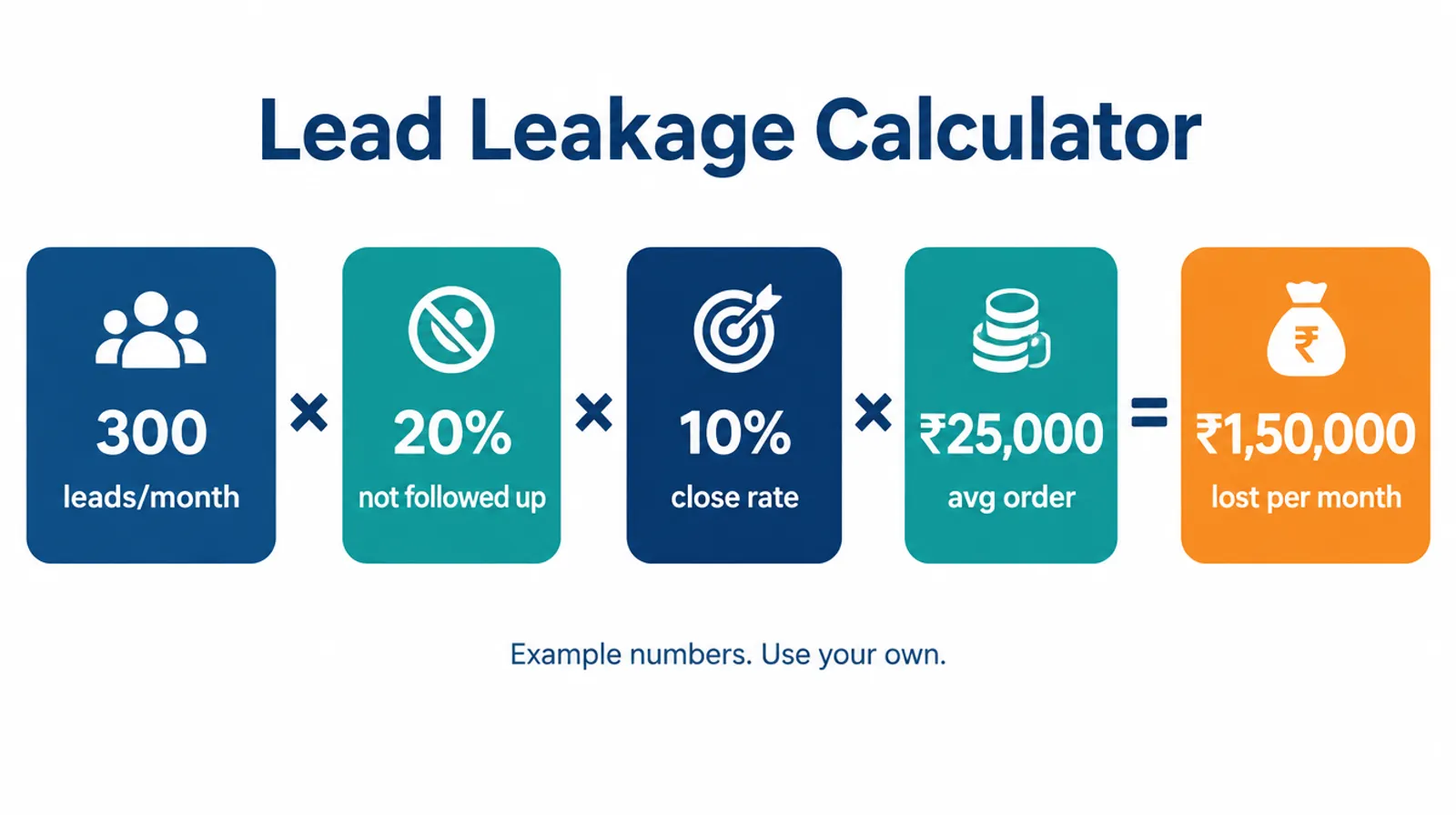
The Lead Leakage Calculator estimates how much revenue you lose each month from leads that never get a proper follow-up. It uses four numbers you already know, and it’s the fastest way to decide whether a lead management system is worth paying for.
The formula:
Monthly revenue lost = Leads per month × % of leads not followed up × Your close rate × Average order value
A worked example (illustrative numbers, plug in your own):
| Input | Example value |
|---|---|
| Leads per month | 300 |
| Leads with no proper follow-up | 20% (60 leads) |
| Close rate on followed-up leads | 10% |
| Average order value | ₹25,000 |
| Revenue lost per month | 300 × 0.20 × 0.10 × ₹25,000 = ₹1,50,000 |
That’s ₹18 lakh a year in this example. Even if only half of that is recoverable, it dwarfs the cost of most lead management software.
How to find your real leak percentage: pull last month’s enquiries from IndiaMART, your ad accounts and WhatsApp. Count how many have a logged call and a next step. The ones that don’t are your leak.
Lead Management Software in India: 8 Options and Prices
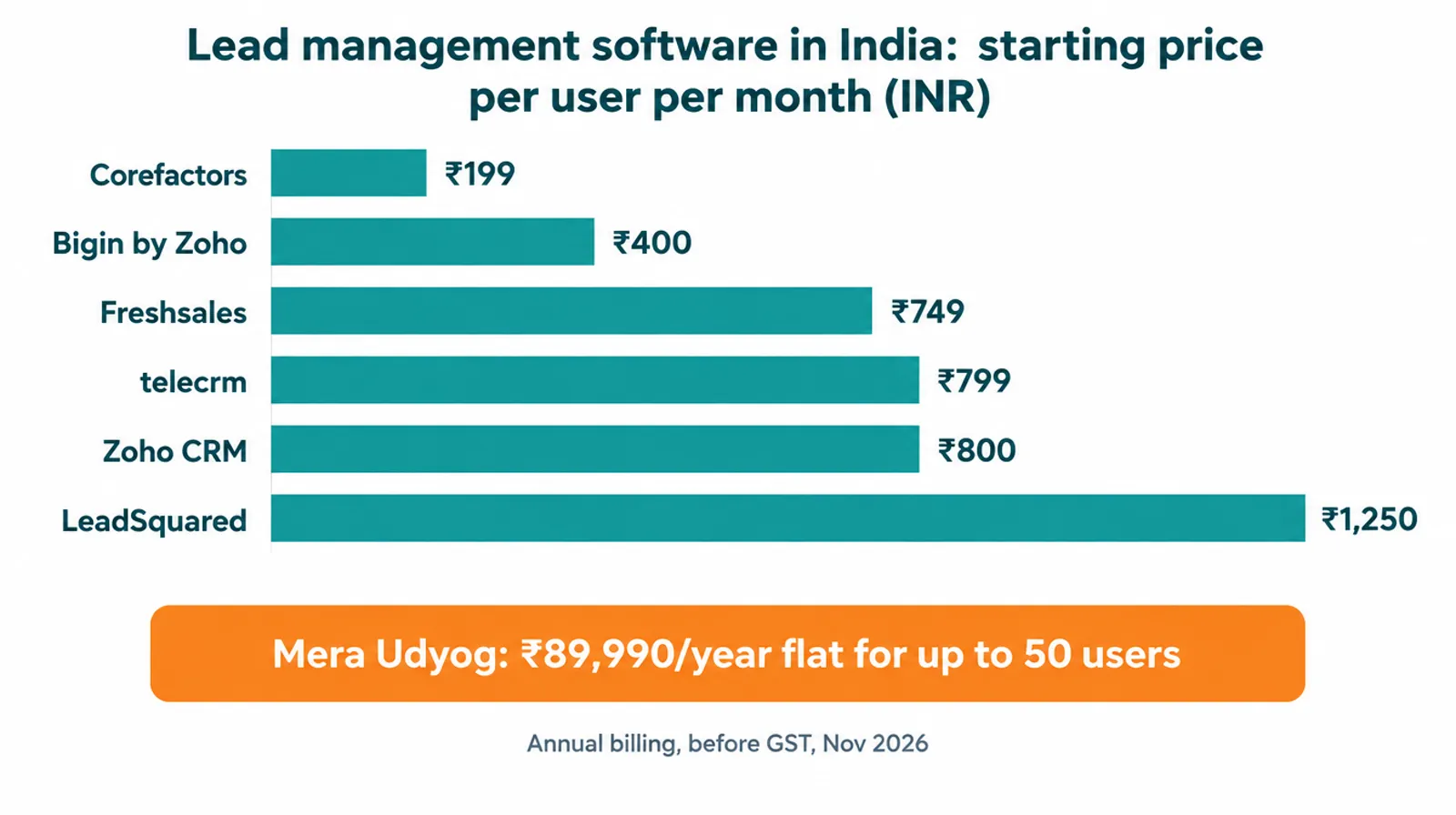
Lead management software in India ranges from free plans for 2 or 3 users to around ₹1,250 or more per user per month for specialist tools. The right pick depends on team size, your main lead sources, and whether you also need quotations, billing or HR in the same app.
Disclosure: Mera Udyog is our own product. Prices are before 18% GST, on annual billing where stated, and were checked in November 2026. Confirm on each vendor’s site before buying.
| Tool | Best for | Starting price (INR) | Free option |
|---|---|---|---|
| Mera Udyog | Businesses with 20 to 500 people wanting lead management, CRM, billing and attendance in one app | ₹9,999/month or ₹89,990/year for up to 50 users | 7-day trial |
| HubSpot CRM | Very small teams testing a CRM | Free for up to 2 users | Yes |
| Zoho CRM | Teams wanting deep customisation | ₹800/user/month (Standard) | Free for up to 3 users |
| Bigin by Zoho | Simple pipelines for small teams | ₹400/user/month (Express) | Free edition |
| Freshsales | AI lead scoring | ₹749/user/month (Growth) | Free plan |
| telecrm | Calling-heavy teams | ₹799/user/month | Demo |
| LeadSquared | Large inbound volumes, field teams | From ₹1,250/user/month | Demo |
| Corefactors | Budget-focused teams | From ₹199/user/month (vendor claim) | Check vendor |
Pricing sources: Mera Udyog, Bigin, Zoho CRM and Freshsales via reseller pages, telecrm, LeadSquared, Corefactors, HubSpot free plan limits via SpotDev.
A few things the price tag hides:
- Per-user pricing grows with every hire. Mera Udyog’s flat plan works out to about ₹150 per user per month at 50 users.
- Add-ons add up. telecrm’s WhatsApp sync, for example, is ₹1,999 one-time plus ₹200 per user per month.
- Free lead management software has limits. HubSpot’s free CRM includes one pipeline and basic automation only.
Lead Data and the DPDP Act: A Checklist for Indian Businesses
India’s Digital Personal Data Protection (DPDP) Act applies to the names, phone numbers and emails sitting in your CRM or lead tracker. The DPDP Rules were notified on November 13, 2025, and most obligations, including notice and consent requirements, take effect after 18 months, in May 2027 (AZB & Partners summary).
The penalties are serious. The Act’s Schedule allows fines of up to ₹250 crore for failing to take reasonable security safeguards, and up to ₹50 crore for breaching other provisions (DPDP Act Schedule).
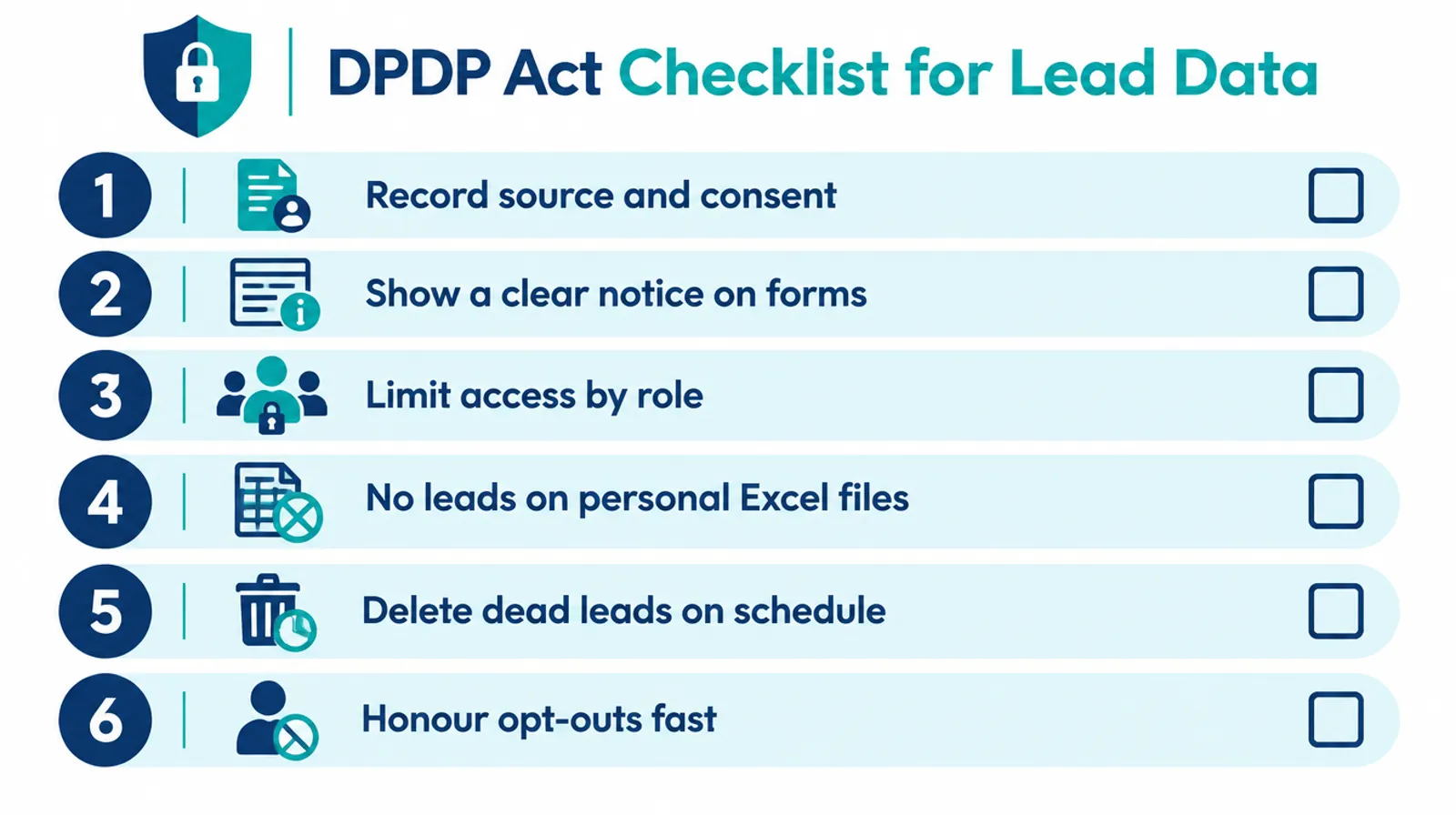
Here’s a practical starting checklist:
- Record the source and consent for every lead: which form, ad or marketplace it came from, and what the person agreed to.
- Show a clear notice on your website forms and lead ad forms about how you’ll use the data.
- Limit access. Salespeople see their own leads only; exports are restricted to admins.
- Stop downloading leads to personal phones and Excel files that leave the office.
- Delete or archive dead leads on a fixed schedule instead of keeping everything forever.
- Honour opt-outs fast. If someone says “don’t call”, mark it in the system so nobody calls again.
Important
This is general information, not legal advice. Check your specific obligations with a lawyer before May 2027.
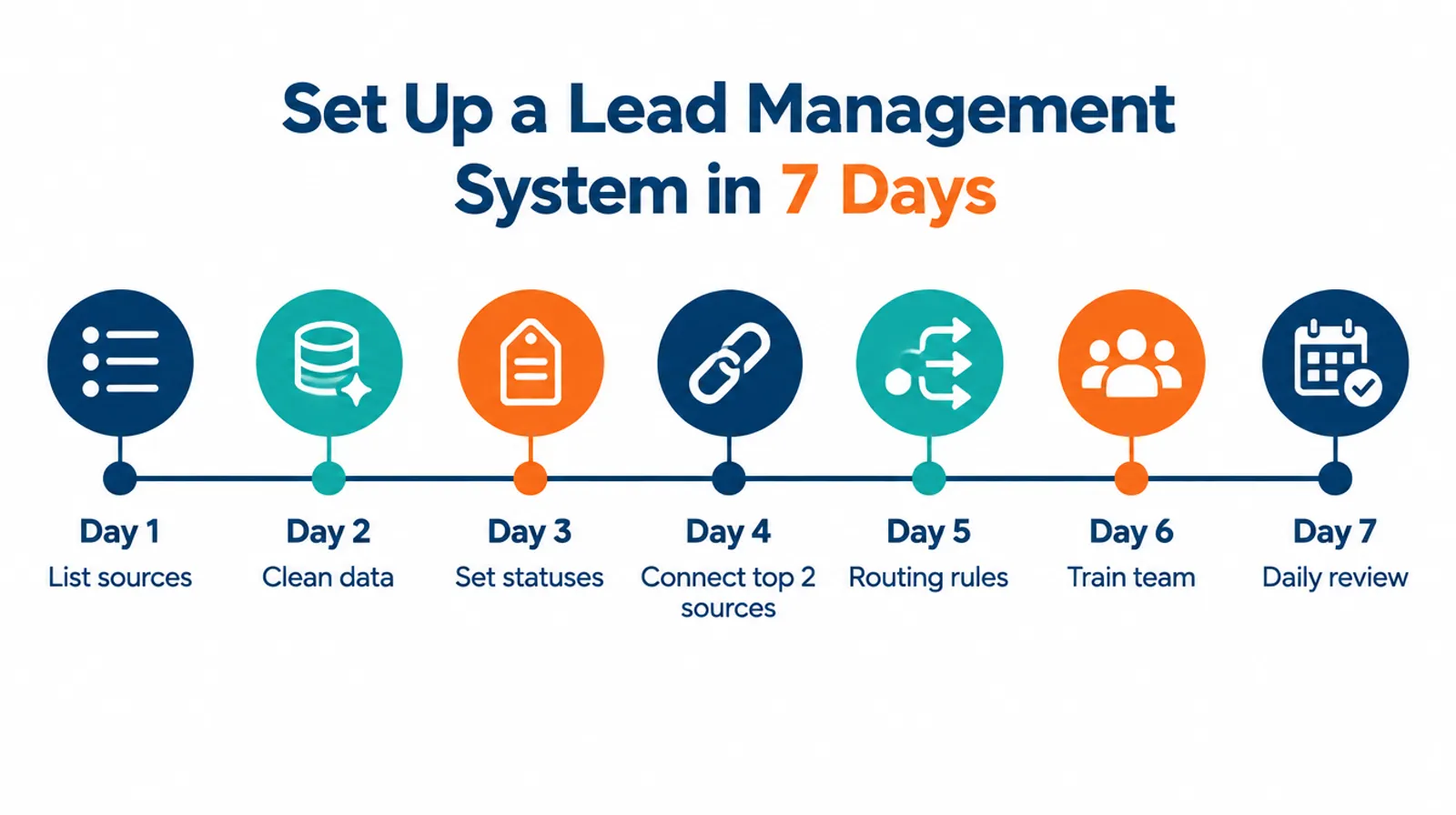
How to Set Up a Lead Management System in 7 Days
You can set up a basic lead management system in about 7 days if you start with your top lead sources and one simple rule: every lead gets an owner and a next step. Here’s a day-by-day plan.
| Day | Task |
|---|---|
| 1 | List your lead sources. Write down every channel and roughly how many leads each sends per month. |
| 2 | Clean your existing data. Pull leads from Excel, phones and notebooks. Remove duplicates and anything older than 6 months that went nowhere. |
| 3 | Set your statuses. Keep it to 5 or 6: New, Contacted, Interested, Quotation Sent, Won, Lost. |
| 4 | Connect your top 2 sources. Usually IndiaMART and Meta lead ads, or website and WhatsApp. |
| 5 | Set routing rules. Decide who gets which leads, and set a response-time target (for example, first call within 30 minutes during work hours). |
| 6 | Train the team. One hour, on their phones, logging real calls. |
| 7 | Start the daily review. A 10-minute morning check of new, untouched and overdue leads. |
Pro tip
Don’t connect every source on day one. Get the team logging calls on the top two sources first. Habits matter more than integrations.
Train everyone who touches a lead, not just the sales desk. When Sidheshwarr RMC rolled out Mera Udyog, it brought its workforce across 3 plants and head office onto one system, so enquiries, quotations and orders all live in one place (case study).
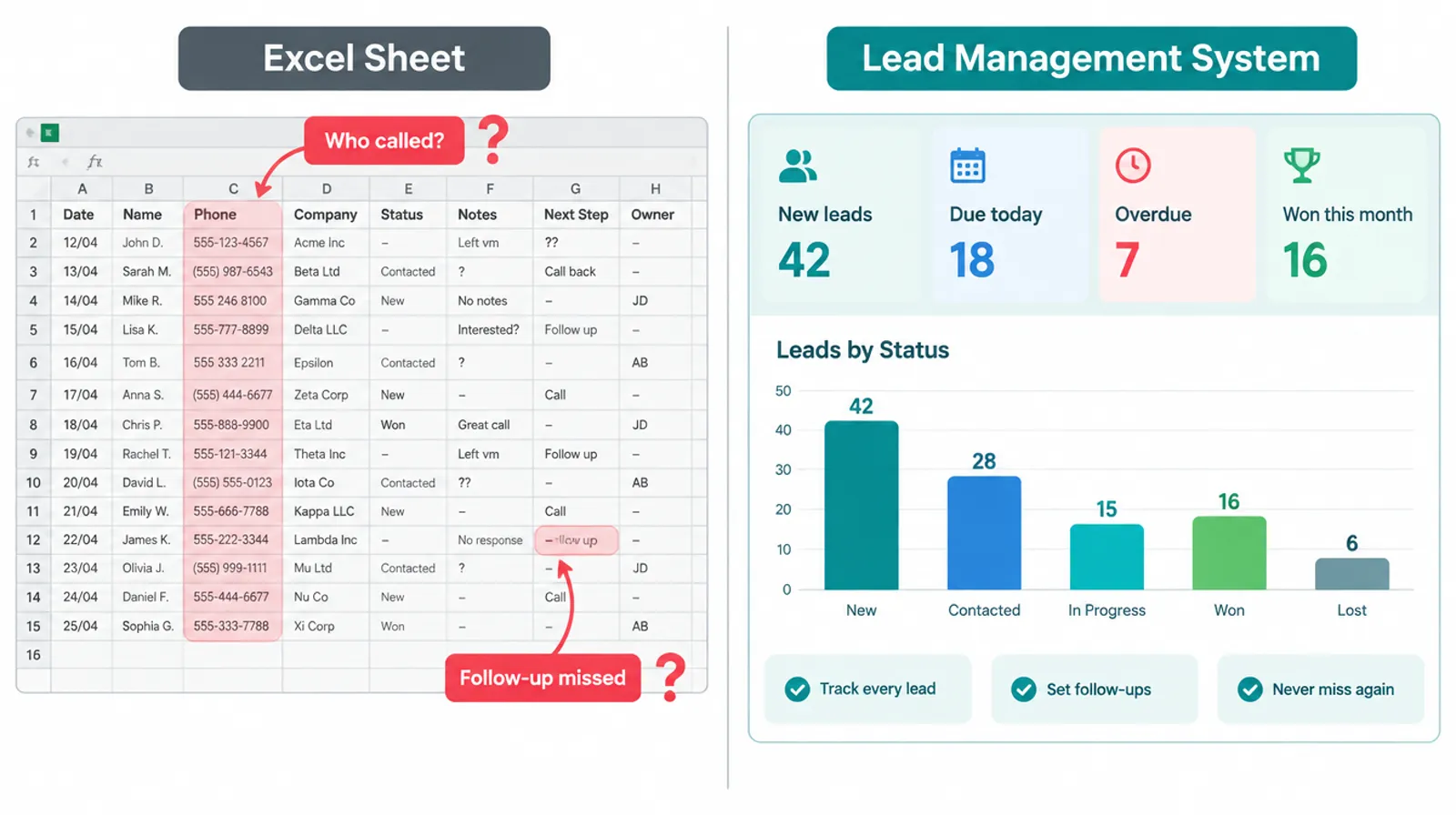
Excel vs a Lead Management System: When to Switch
Excel works as a lead tracker until more than one person handles leads, or until leads come from more than two sources. After that, nobody knows who called whom, and the sheet becomes a record of what should have happened.
Signs it’s time to switch:
- Two salespeople have called the same lead (or nobody has).
- You can’t say which source brought last month’s sales.
- Follow-ups depend on someone’s memory or a notebook.
- A salesperson left and took their leads with them on their phone.
- You don’t know your average first-response time.
If three or more sound familiar, proper lead management software will likely pay for itself in recovered leads alone. Run the Lead Leakage Calculator above to put a number on it.
Using Mera Udyog in a factory or multi-branch business? See how manufacturing teams and retail chains route leads to the right plant or outlet.
Now It’s Your Turn
A lead management system isn’t about collecting more leads. It’s about making sure every lead you already paid for gets a fast call, an owner and a next step.
Start with the 6R Lead Flow, run the Lead Leakage Calculator on last month’s numbers, and pick the tool that covers your real sources.
Want to see lead capture, SIM call tracking and follow-ups working together? Book a free Mera Udyog demo.
Frequently asked questions
What does a lead management system do?
A lead management system captures enquiries from every source, assigns them to salespeople, tracks calls and follow-ups, and reports which leads become customers. It replaces Excel sheets and notebooks with one shared list so no enquiry is forgotten.
Is a CRM the same as a lead management system?
No. Lead management software focuses on turning enquiries into qualified prospects, while a CRM manages the full customer relationship, including deals, quotations, orders and repeat sales. Most CRMs include lead management features.
What is the best lead management software in India?
The best lead management software in India depends on team size and needs. Bigin by Zoho and Freshsales suit small teams on a budget, telecrm and LeadSquared suit calling-heavy and high-volume teams, and Mera Udyog suits businesses with 20 to 500 people that want leads, CRM, billing and attendance in one app.
How much does a lead management system cost in India?
Paid lead management software in India typically starts at ₹400 to ₹1,250 per user per month on annual billing, before 18% GST. Free plans exist from HubSpot (up to 2 users), Zoho CRM (up to 3 users), Bigin and Freshsales, while flat-priced options like Mera Udyog cost ₹89,990 a year for up to 50 users.
Can I use Excel as a lead management system?
You can use Excel for a single salesperson with one or two lead sources. Once several people share leads or leads come from many channels, Excel can’t assign owners, send reminders or track calls, so leads start slipping through.
What is lead scoring?
Lead scoring is a way of ranking leads by how likely they are to buy, using points for things like budget, product interest or how quickly they replied. Small teams can start with simple hot, warm and cold labels before using points-based scoring.
About the Author
This guide is written by the Mera Udyog Team. Mera Udyog is an all-in-one business app for Indian manufacturers and multi-outlet retailers with 20 to 500 people, built and operated by Saadhan Innovation Labs Private Limited. Questions about this guide? Write to hello@meraudyog.com.
Sources we checked (15)
- Oldroyd, McElheran and Elkington, “The Short Life of Online Sales Leads”, Harvard Business Review, 2011
- MIT / InsideSales Lead Response Management Study, 2007
- Drift lead response survey of 433 companies (archived), 2017
- IndiaMART Lead Manager Pull API documentation, 2026
- IndiaMART results press release, quarter ended Sep 30, 2026, 2026
- AZB & Partners: DPDP Act phased rollout and compliance milestones, 2025
- DPDP Act 2023, The Schedule (penalties)
- Bigin by Zoho India pricing, 2025
- Zoho CRM pricing in India, IT for SME, 2026
- telecrm pricing, 2026
- LeadSquared lead management system, 2026
- Corefactors: What is a lead management system, 2026
- SpotDev: Is HubSpot free?, 2026
- Sidheshwarr RMC case study, Mera Udyog, 2026
- Mera Udyog pricing, 2026